

Like always, October was a busy month for everyone over at QuickVid.
Though QuickVid works like a charm, there are always improvements to be made based on your feedback and our ideas.
October was no different.
We made a lot of improvements and shipped out new features to ensure you have the best
New features
We sent out a few new features in October and prepared the dashboard for even more features in November. Here’s a quick recap of the new goodies you now have access to.
Video library progress indication
All the videos you create in QuickVid run in the background. That means, your videos would be created whether you kept the video generation page open or not.
There was just one problem: if you left the video generation page, you’d have no idea if a video was generating or not.
You just had to wait patiently for it to appear in your video library.
Needless to say, that was a poor experience.
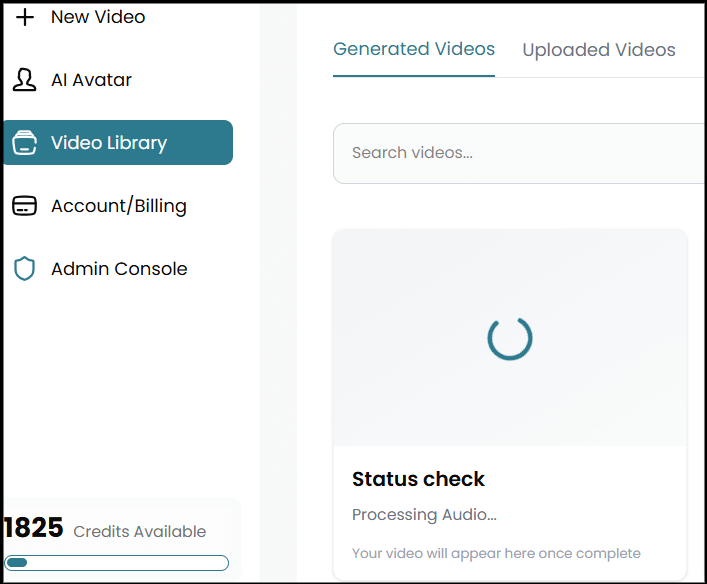
We’ve now added a clear indicator that lets you know your video is in progress and the step it is in the generation process.
Admin dashboard
We’ve always had an admin dashboard, but it was basic. We could simply monitor users numbers and see basic details about those users.
We’ve taken the time to improve the entire admin dashboard, which we use to administer the app.
At first glance, this has nothing to do with you. But, it does. We can now provide better support by impersonating your account (with your permission), adding credits to your account, troubleshooting errors, and a lot more.
Of course, the admin interface has a lot of sensitive information so I won’t share it here. Just know that we’re better able to meet your needs.

New Onboarding
Onboarding can be useful or it can be useless. We updated our onboarding to make it easier for you to get in and do what you came for.
You no longer have to click around the app trying to figure things out. Instead, you’ll understand exactly what you can do with a guided process.
We’ve also reduced the number of ‘irrelevant’ screens.
Everything is now geared towards you getting a better outcome, faster.
Help videos throughout the app
We’ve always thought of QuickVid as a straightforward app that’s easy to use. And, for most people, it is.
With that being said, some people stumbled in different areas of the app. How do I do X? What’s up with Y? How does this feature work?
We get it. You didn’t create the app, we did. That means we understood how things were supposed to work with little to know explanation.
Real user feedback showed us that it wasn’t always the case.
To make it easier for new and existing customers alike, we’ve gone through and created walkthrough videos for almost every section of the app. When new features are released, we’ll create new walkthrough videos for those features as well.
You’ll always have the latest info about how things work within QuickVid.
Google Authentication
The last feature we introduced is a bit overdue.
More specifically, we had it then removed it for various reasons. We were able to reintroduce it in October.
What does that mean for you?
If you’re new to QuickVid, you can use your Gmail account to register and subsequently log in. It only takes a few button clicks instead of having to type it out, come up with a new password, and then confirm your email.
It’s more convenient.
Updates and improvements
We also made a few updates and improvements to QuickVid. These include what I like to refer to as quality of life improvements and product improvements.
Some have a direct impact on the product EG things that aren’t bugs but are annoying and things that improve the product experience.
Optimized AI multi-word display
For AI stories, you need a voiceover and captions on the screen. This is part of how the video works. You could also choose to display multiple words or a single word at a time.
The problem was that when you chose to display multiple words at a time, you’d sometimes see a large block of text that took up most of the screen.
Needless to say, that wasn’t ideal.
We’ve taken care of that issue so that only a few words will show up on the screen at any given time. The videos are cleaner and are better able to do their job.
UGC hook and UGC demo previews are larger
Previously, there was a little discrepancy between how the UGC hook/UGC demo videos preview looked and the final video.
For example, when you’re choosing the font size, you do that with the preview in mind. Since the preview area is smaller than the final video, the fonts would turn out smaller than you expected.
The discrepancy wasn’t much, and in most cases, it wouldn’t matter.
We noticed it and didn’t like it, so we fixed it.
We’ve made the preview area larger so it accurately reflects how the overlaid fonts will look in the final video.
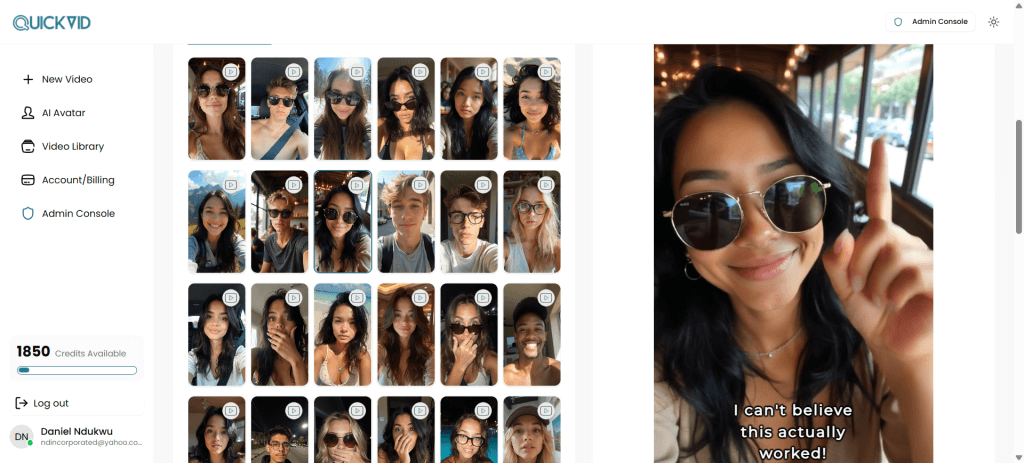
Image and video icons
When you’ve created custom AI avatars in QuickVid, you create the video, then you create the image.
When you’re looking at the video library, all of them look the same at first glance. In other words, you may not know which one is the image and which one is the video.
It’s relatively easy to identify if you spend a moment, but why should you spend that time when it should be obvious?
We’ve gone ahead and added icons that make it easy to differentiate between video and images without the custom AI avatar library.
Speed up the application
In October, we got an unpleasant support message. It was a bit over the line, so I won’t share it here. The essence of the message was that ‘QuickVid is slow.’
While we were a bit upset about the way the message was delivered, we had to think about it objectively. Is what they said true?
The answer was yes.
So, we looked at why QuickVid was slow and made a few major changes that have drastically sped up the app.
While it’s not as fast as a pure HTML page, it’s much faster than many of the other tools I use regularly.
The end result of this is that you can do what you need to do even faster.
Speed up video rendering speed
One thing that we’re constantly working on is speeding up how quickly videos are generated. There are multiple steps in the video generation process, even if it looks straightforward at first glance.
Every extra bit of complexity makes it take longer for videos to render. With that understanding, we stripped away some of the complexity, and videos are now rendering much faster.
What used to take 15 minutes, now takes 10 minutes.
Of course, we’re not done with trying to make QuickVid’s video rendering faster. This is just the first step in a long process.
Fixes
QuickVid is a stable app, but there’s no such thing as an app that doesn’t have bugs. As much as we hate to admit it, we had to fix some bugs in October.
Uploaded videos 404 error fix
When you upload your videos to QuickVid to use in your content, we store them for you so they’ll be available when you to use later.
You can look at the videos you’ve uploaded in the video library. Previously, when trying to access those videos, it was throwing a ‘missing file error’.
We went in and sorted it out so you can access your uploaded videos from the library.
Updated the UGC demo tool
There was a minor bug with the UGC demo tool that made the video creation fail when you uploaded background music.
It was due to a minor file path issue that we were able to find and solve.
Now, the UGC demo videos work like a charm.
Conclusion
As you can see, we’ve been hard at work building out QuickVid to ensure it’s stable and meets your needs.
We’ve got a lot of features coming up in November and December that will make it an even more powerful suite of tools for your video creation needs.
If you’ve not done so already, go ahead and register an account here.

