Getting hit with a copyright claim can tank your channel’s growth overnight. One minute you’re uploading content, the next you’re staring at a notification that could cost you monetization, or worse, your entire channel.
The good news? Most copyright issues are completely preventable when you know the rules.
Learning how to avoid copyright on YouTube isn’t just about staying out of trouble. It’s about building a sustainable content strategy that protects your channel’s future.
Whether you’re creating YouTube Shorts, long-form videos, or building a faceless YouTube channel, understanding copyright is non-negotiable.
Key Takeaways
- Own or license everything: You must have complete ownership or explicit permission from copyright holders for all music, video clips, and images used in your content
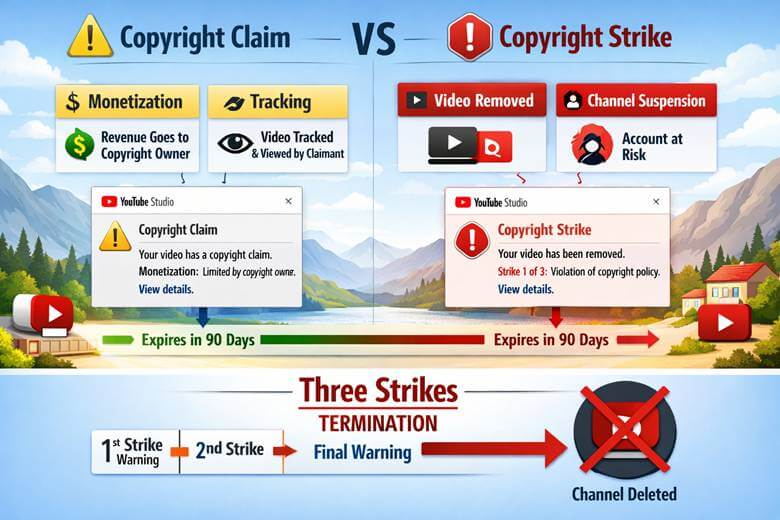
- Copyright claims vs. strikes: Claims allow monetization by copyright owners without penalties, while strikes remove videos and can terminate your channel after three violations
- No video is exempt: Copyright rules apply to all content, monetized or not, public or private, Shorts or long-form videos
- Minor edits don’t protect you: YouTube’s Content ID detects altered content including slowed, sped-up, pitch-shifted music and flipped or cropped videos
- New authenticity policies: YouTube’s recent updates flag mass-produced, AI-generated, and repetitive content as “inauthentic,” potentially terminating channels without warning
Understanding YouTube’s Copyright System
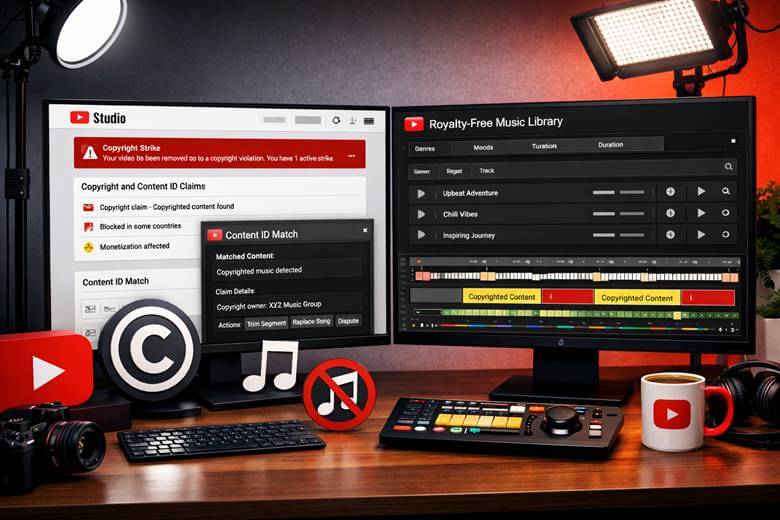
YouTube’s copyright enforcement operates through two primary mechanisms: Content ID and manual copyright strikes. Content ID is an automated system that scans every video uploaded to the platform. Yes, even private and unlisted ones, comparing your content against a massive database of copyrighted material.
Here’s what makes this system particularly powerful: it can detect music that’s been slowed down, sped up, or pitch-shifted. It catches videos that have been flipped horizontally or cropped. Those “tricks” people share online? They don’t work.
The system runs constantly. A video that’s been live for months can suddenly receive a claim because a copyright owner just added their content to the Content ID database.
Copyright Claims vs. Copyright Strikes
Understanding the difference between these two is crucial for avoiding copyright problems on YouTube.
Copyright Claims:
- Allow copyright owners to monetize, track, or block your video
- Don’t penalize your channel directly
- Can appear immediately during upload or weeks later
- The copyright owner controls what happens to your video
Copyright Strikes:
- Legal takedown notices that remove your video
- Come with serious channel penalties
- Expire after 90 days if you don’t get additional strikes
- Three strikes terminate your entire channel permanently
After your first strike, you must complete YouTube Copyright School and lose access to monetization and live streaming for seven days. Get three strikes, and your channel, all videos, and the ability to create new channels disappear.
How to Avoid Copyright on YouTube: Essential Strategies
Own or Fully License All Content
This is the golden rule. You need complete ownership or explicit permission from copyright holders for every element in your videos.
Writing “no copyright infringement intended” in your description does absolutely nothing. It’s like putting a disclaimer on stolen property. It doesn’t make it legal.
Here’s what you need to license:
- Music and sound effects
- Video footage and clips
- Images and graphics
- Voice recordings
- Brand logos and trademarks
Use Pre-Cleared Music Libraries
The most reliable way to avoid music copyright issues is using platforms specifically designed for creators. These services provide pre-cleared music licenses that explicitly allow use in video content.
Popular royalty-free music options include:
- YouTube Audio Library (free, built into YouTube Studio)
- Epidemic Sound
- Artlist
- Soundstripe
- AudioJungle
When creating YouTube Shorts or longer content, always verify the license covers your intended use. That includes commercial, monetization, and platform-specific rights.
Create Original Content
Nothing beats creating content from scratch. When you’re filming, recording, or designing everything yourself, copyright concerns vanish.
This approach works especially well for:
- Commentary and reaction videos (with your own footage)
- Educational content (using your own examples)
- Product reviews (filming products you own)
- Tutorials and how-tos (demonstrating processes yourself)
If you’re building content through YouTube automation, ensure your workflow includes original asset creation or properly licensed materials.
Understand Fair Use (But Don’t Rely On It)
Fair use is a legal doctrine that allows limited use of copyrighted material without permission for purposes like criticism, commentary, news reporting, teaching, or research.
However, fair use is:
- Determined on a case-by-case basis
- Decided by courts, not YouTube
- Not a guaranteed protection
- Often misunderstood by creators
Even if you believe your use qualifies as fair use, you can still receive copyright claims or strikes. You’d need to dispute them, potentially leading to legal proceedings. For most creators, it’s safer to avoid relying on fair use entirely.
The Current Copyright Landscape: New Rules You Need to Know
Inauthentic Content Policies
In mid-2025, YouTube updated its “Repetitious Content” guidelines to include “Inauthentic Content” language. This represents a major shift in enforcement.
The platform can now terminate channels for “mass production” without warning. This affects creators who:
- Use excessive stock footage (50% or more in consecutive videos)
- Reuse clips or animations repeatedly
- Upload unedited AI-generated images
- Use identical title structures across all videos
AI Detection and Labeling
YouTube integrated SynthID for AI labeling and updated detection mechanisms specifically for AI-generated content.
Videos triggering the inauthentic content policy include those with:
- AI-generated images lacking editing (cropping, filters, zoom effects)
- Mass-produced content with minimal human input
- Repetitive visual patterns across uploads
This doesn’t mean you can’t use AI tools. It means you need to add genuine creative input and editing to avoid appearing inauthentic.
Visual Authenticity Requirements
Your videos need visual diversity and originality. YouTube now flags content with:
- 50% or more stock footage
- Reused clips from your own channel in consecutive videos
- Reused clips from other channels
- Unedited AI-generated images
When clipping YouTube videos or repurposing content, ensure you’re adding substantial original commentary, editing, or creative transformation.
Practical Steps to Protect Your Channel
Keep in mind that the following steps may seem tedious. And, depending on the way you create your content, they can be. It bears repeating, the safest way to create YouTube videos is to use original material. That said, it’s not always possible. So, below, you’ll learn some ways to protect yourself.
Before Uploading
1. Audit every asset in your video
- List all music tracks used
- Identify all video clips and their sources
- Note all images and graphics
- Verify voice-over rights
2. Verify licenses and permissions
- Check license terms for commercial use
- Confirm platform-specific allowances (YouTube)
- Save license documentation
- Screenshot permission emails
3. Use YouTube’s built-in tools
- Run videos through YouTube Studio’s copyright checker
- Check music against YouTube Audio Library
- Review Content ID claims before publishing
After Uploading
Monitor your YouTube Studio dashboard regularly. You’ll receive notifications there and possibly by email when claims appear.
Remember: copyright owners can change their policy at any time. A video that’s fine today might get claimed or blocked tomorrow if the copyright holder updates their preferences.
Handling Copyright Claims
If you receive a claim:
- Review the claim details in YouTube Studio
- Verify if it’s accurate (did you actually use that content?)
- Consider your options:
- Accept the claim (video stays up, owner monetizes)
- Remove the copyrighted content (trim or mute)
- Replace with licensed content
- Dispute if you have legal grounds
Never ignore copyright strikes. They don’t disappear on their own, and accumulating three terminates your channel.
Building a Copyright-Safe Content Strategy
For YouTube Shorts
YouTube Shorts face the same copyright rules as long-form videos. Non-monetized content isn’t exempt.
Safe approaches for Shorts:
- Use YouTube’s built-in music library for Shorts
- Create original audio content
- Film original footage
- Use licensed stock footage with proper rights
For Automated Content
If you’re exploring YouTube automation or TikTok automation, copyright compliance becomes even more critical.
Automation-safe practices:
- Build workflows around licensed content libraries
- Create original scripts and voice-overs
- Use properly licensed stock footage
- Implement human review before publishing
For Faceless Channels
Faceless YouTube channels often rely heavily on stock footage, music, and voice-overs. These are all potential copyright minefields.
Protect faceless content by:
- Investing in comprehensive stock footage licenses
- Using text-to-speech tools (verify commercial rights)
- Creating original animations and graphics
- Building a library of licensed music
Common Copyright Mistakes to Avoid
❌ Assuming “no copyright infringement intended” protects you – It doesn’t
❌ Thinking credit in the description is enough – It’s not
❌ Believing minor edits bypass Content ID – They don’t
❌ Assuming non-monetized videos are exempt – They aren’t
❌ Using the same title structure repeatedly – Now flagged as spam
❌ Uploading unedited AI-generated images – Triggers inauthentic content policies
❌ Relying on “transformative use” without legal advice – Risky approach
When creating content for multiple platforms, consider how TikTok vs YouTube copyright approaches differ and adjust your strategy accordingly.
🛡️ YouTube Copyright Risk Assessment
Answer these questions to evaluate your copyright risk level
Conclusion
Learning how to avoid copyright on YouTube is essential for every creator. The landscape has evolved with stricter authenticity policies, advanced AI detection, and zero tolerance for mass-produced content.
But the fundamentals remain unchanged: own your content, license what you can’t create, and stay informed about policy updates.
Your channel’s longevity depends on building sustainable practices now. Start by auditing your current content for copyright vulnerabilities. Replace copyrighted assets with licensed alternatives. Document your permissions and licenses. Monitor your YouTube Studio dashboard regularly.
The investment in proper licensing and original content creation pays dividends in channel security and long-term growth.
Whether you’re creating content with video automation tools or filming everything yourself, copyright compliance isn’t optional. It’s the foundation of a successful YouTube channel.