


YouTube Shorts Aspect Ratio: Your Complete Guide to Vertical Video Success
Here’s something most creators get wrong: they spend hours crafting the perfect YouTube Short, only to upload it and see those dreaded black bars on the sides.
The culprit?
Wrong aspect ratio.
The YouTube Shorts aspect ratio isn’t just a technical detail. It’s the difference between your content getting buried or blowing up in the Shorts feed.
YouTube Shorts has turned into one of the most powerful discovery engines on the internet. But if you’re not using the correct dimensions, the algorithm won’t even recognize your video as a Short.
That means no Shorts shelf placement, no dedicated feed visibility, and no chance at those viral views you’re after.
Key Takeaways
- The optimal YouTube Shorts aspect ratio is 9:16 (vertical format) with a resolution of 1080×1920 pixels for maximum quality and full-screen mobile viewing
- Using the correct aspect ratio triggers YouTube’s algorithm to automatically categorize your content as Shorts and place it in the dedicated Shorts feed
- Square videos (1:1 aspect ratio at 1080×1080 pixels) are also accepted, making it easier to repurpose content across multiple platforms
- YouTube Shorts must be 180 seconds or less, with a maximum file size of 2GB in MP4 or MOV format
- Getting the technical specs right is just the first step. YouTube Shorts represents a massive business growth opportunity that most brands are still sleeping on
What Is the YouTube Shorts Aspect Ratio?
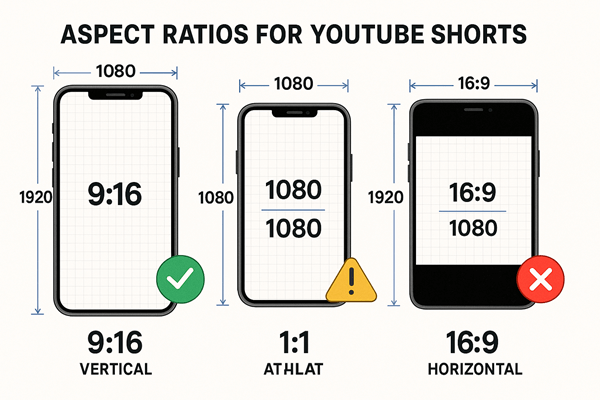
The YouTube Shorts aspect ratio is 9:16, which means your video is nine units wide and sixteen units tall. Think of it as your smartphone turned vertically. That’s the natural viewing position for Shorts content.
This vertical format isn’t arbitrary.
YouTube designed Shorts to compete directly with TikTok and Instagram Reels, platforms that pioneered the vertical video revolution.
When you upload a video in 9:16 format, YouTube’s algorithm immediately recognizes it as Shorts-eligible content and pushes it to the dedicated Shorts feed.
Here’s what makes this aspect ratio so critical: it provides a full-screen, immersive mobile experience. No black bars. No wasted screen real estate. Just your content filling every pixel of the viewer’s display.
The math behind 9:16 is straightforward. If you’re working with the optimal resolution of 1080 pixels wide by 1920 pixels tall, you get that perfect 9:16 ratio. Divide 1920 by 1080, and you get 1.777… which simplifies to 16:9 when flipped vertically.
Why Aspect Ratio Matters for YouTube Shorts
YouTube’s algorithm uses aspect ratio as a primary signal to categorize content. Upload a horizontal 16:9 video, and YouTube treats it as regular content.
Upload that same video in 9:16, and suddenly you’re eligible for Shorts distribution. A completely different discovery mechanism with exponentially higher reach potential.
The Shorts feed operates differently from traditional YouTube recommendations. It’s designed for rapid consumption, with viewers swiping through content at lightning speed. Your video needs to grab attention instantly, and that starts with filling their entire screen.
Black bars kill engagement. They signal to viewers that the content wasn’t created specifically for them. It’s like showing up to a business meeting in casual clothes,technically, you’re there, but you’re not making the right impression.
Technical Specifications for YouTube Shorts Aspect Ratio
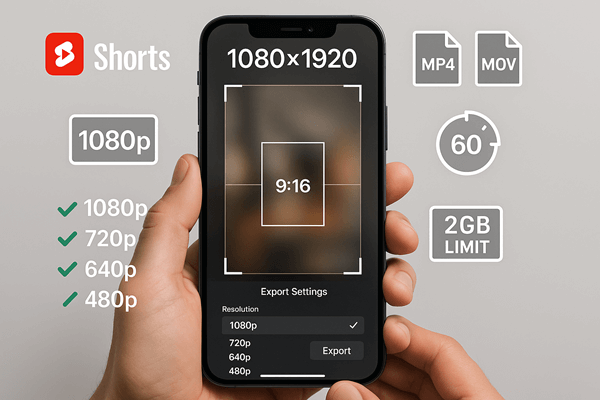
Let’s get into the exact numbers you need. The recommended resolution for YouTube Shorts is 1080×1920 pixels. This gives you the highest quality output that YouTube supports for Shorts content.

However, YouTube accepts a range of resolutions as long as they maintain the 9:16 aspect ratio:
- 1080×1920 (Full HD, recommended)
- 720×1280 (HD, acceptable)
- 480×854 (SD, minimum for mobile)
The platform also accepts square videos at 1:1 aspect ratio (1080×1080 pixels). This flexibility is huge for creators who want to repurpose content across Instagram, Facebook, and other platforms that favor square formats.
While square isn’t optimal for YouTube Shorts, it still qualifies for the Shorts feed and eliminates the need to create multiple versions of the same content.
File Format and Size Requirements
YouTube Shorts supports two file formats:
- MP4 (most common, widely compatible)
- MOV (Apple’s format, also accepted)
Your file size can’t exceed 2GB. That’s generous considering Shorts max out at 180 seconds. You’d need extremely high bitrate to hit that limit with a one-minute vertical video.
For creators using automated short-form video creation tools, these specs are usually handled automatically. But if you’re editing manually, double-check your export settings before uploading.
Duration Limits
YouTube Shorts must be 60 seconds or less to appear in the Shorts feed. The platform technically supports Shorts up to 3 minutes, but only the sub-60-second videos get full Shorts treatment.
This constraint forces creative discipline. You can’t ramble. Every second counts. That’s actually perfect for business content. Attention spans are short, and your message needs to land fast.
How to Create Content in the Correct YouTube Shorts Aspect Ratio
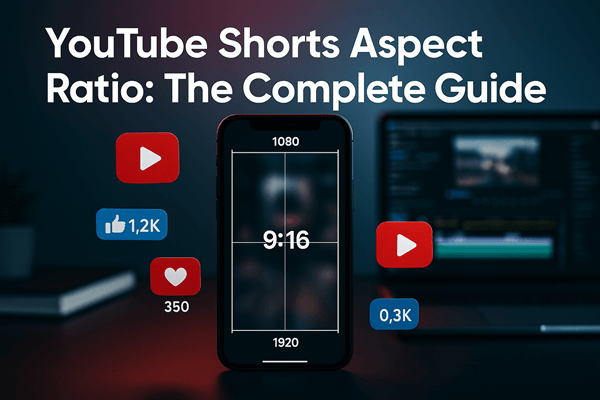
The easiest method? Record directly on your phone in vertical orientation.
Seriously, it’s that simple.
Your smartphone camera defaults to the perfect aspect ratio when held vertically.
Most modern phones shoot at 1080×1920 or higher, so you’re already hitting the optimal resolution without any extra effort. Just open your camera app, hold your phone vertically, and start recording.
Converting Existing Content
Got horizontal footage you want to repurpose?
You’ll need to convert it to 9:16. Here’s the reality: you can’t just rotate a 16:9 video and call it done. You’ll end up with massive black bars on the sides.
Instead, you have three options:
Crop and reframe: Use editing software to crop your horizontal video into a vertical frame. This works if your subject is centered and you can afford to lose the sides of the frame.
Add background elements: Place your horizontal video in the center of a 9:16 canvas and fill the top and bottom with blurred backgrounds, graphics, or text overlays. This maintains your full horizontal frame while fitting the vertical format.
Shoot with both formats in mind: Plan your shots knowing you’ll need both horizontal and vertical versions. Keep important elements in the center “safe zone” that works for both aspect ratios.

Video editing platforms like Adobe Premiere Pro, Final Cut Pro, and DaVinci Resolve all include preset aspect ratio templates for YouTube Shorts.
Select the 9:16 preset, drop in your footage, and adjust accordingly.
For creators looking to scale production, platforms like QuickVid streamline the entire process by automatically formatting videos to the correct specifications for each platform.
Mobile Editing Apps
Don’t have access to desktop editing software? Mobile apps work just as well:
- CapCut (free, powerful, aspect ratio presets included)
- InShot (intuitive interface, quick exports)
- Adobe Premiere Rush (mobile version of Premiere Pro)
- YouTube’s built-in editor (basic but functional)
These apps include 9:16 templates specifically for Shorts, TikTok, and Reels. You can shoot, edit, and upload entirely from your phone without ever touching a computer.
Optimizing Your YouTube Shorts for Maximum Performance
Getting the aspect ratio right is table stakes. To succeed with Shorts, you need to optimize every element of your content.
The First Three Seconds Rule
Viewers decide whether to keep watching or swipe away in the first three seconds. That’s it. Three seconds to hook them.
Start with movement, a bold statement, or a visual pattern interrupt. Don’t waste time with intros or branding. Jump straight into the value or entertainment.
Text Overlays and Safe Zones
YouTube’s interface includes UI elements that can cover parts of your video. The bottom portion contains the title, channel name, and action buttons. The sides have swipe zones.
Keep critical text and visual elements in the center 60% of your frame. This ensures nothing important gets covered by YouTube’s interface or viewer interactions.
Use large, bold text that’s readable on small screens.
Keep in mind that subtitles are essential. Most people watch with sound off initially. If your content requires audio, the captions give viewers a reason to unmute.
Thumbnail Considerations
Even though Shorts auto-play in the feed, they still display thumbnails in search results and suggested videos. YouTube recommends 1280×720 pixels for Shorts thumbnails. That’s 16:9, not 9:16.
Design thumbnails that work at both aspect ratios. The center portion should contain your key visual elements since that’s what viewers see in the vertical Shorts feed.
YouTube Shorts as a Business Growth Channel
Here’s what most marketers miss: YouTube Shorts isn’t just another content format. It’s a completely different growth engine with unique advantages over TikTok and Instagram Reels.
Discoverability is insane. YouTube’s recommendation algorithm is the most sophisticated in the world.
It doesn’t just show your Shorts to your existing subscribers. It actively pushes your content to new audiences based on viewing patterns, interests, and engagement signals.
Unlike TikTok, where you’re starting from zero followers every time, YouTube Shorts can drive viewers to your long-form content, channel subscriptions, and external links (once you’re monetized).
The platform is designed to keep people within the YouTube ecosystem, and Shorts serve as the top-of-funnel content that introduces new viewers to your brand.
The Subscriber Conversion Advantage
TikTok followers rarely convert to other platforms. YouTube subscribers are different. They’re opting into your content across multiple formats such as Shorts, long-form videos, live streams, and community posts.
A single viral Short can add thousands of subscribers who then consume your other content. That’s sustainable growth, not just vanity metrics.
Monetization Opportunities
YouTube shares ad revenue with Shorts creators through the YouTube Partner Program. While the per-view payout is lower than long-form content, the volume of views Shorts generate can offset that difference.
More importantly, Shorts serve as lead generation tools. Use them to drive traffic to:
- Long-form videos with affiliate links
- Product demonstrations and sales pages
- Email list sign-ups via pinned comments
- Consulting or service offerings
The ROI on Shorts comes from the entire funnel, not just direct ad revenue.
Platform Longevity and Searchability
TikToks have a short shelf life. They spike, then fade. YouTube Shorts, on the other hand, live on YouTube’s platform. It’s he second-largest search engine in the world.
Your Shorts remain searchable and discoverable months or even years after upload. Evergreen content continues generating views and subscribers long after you’ve moved on to creating new material.
This searchability is massive for businesses. Someone searching for “how to use [your product]” or “[your industry] tips” can discover your Shorts through YouTube search, not just the Shorts feed.
Common YouTube Shorts Aspect Ratio Mistakes to Avoid
Mistake #1: Using 16:9 horizontal video. This is the most common error. Horizontal videos don’t qualify for the Shorts feed, regardless of length. They’ll appear as regular YouTube videos with black bars when viewed on mobile.
Mistake #2: Inconsistent aspect ratios across uploads. Switching between 9:16, 1:1, and 16:9 confuses the algorithm and your audience. Pick a format and stick with it for consistency.
Mistake #3: Ignoring the 60-second limit. Videos longer than 60 seconds don’t get full Shorts distribution. If you have more to say, create a series of connected Shorts or direct viewers to a long-form video.
Mistake #4: Poor video quality. Shooting at less than 1080p makes your content look amateurish, especially when viewers are used to high-quality Shorts from professional creators. Modern smartphones shoot in 4K—there’s no excuse for grainy, pixelated content.
Mistake #5: Forgetting about audio quality. Bad audio is worse than bad video. Invest in a decent microphone or use your phone’s built-in mic in a quiet environment. Background noise and echo kill viewer retention.
Mistake #6: Not optimizing for mobile viewing. Everything about Shorts is mobile-first. If your text is too small, your visuals too detailed, or your pacing too slow, mobile viewers will swipe away instantly.
Advanced Strategies for YouTube Shorts Success
Once you’ve mastered the technical requirements, it’s time to level up your strategy.
Batch Production
Creating Shorts one at a time is inefficient. Instead, batch your production. Dedicate one day to shooting 10-20 Shorts, then edit them all in a single session. This approach maintains consistency and lets you build a content buffer for consistent posting.
Tools that support short-form video creation at scale can dramatically reduce production time while maintaining quality.
Cross-Platform Repurposing
The 9:16 aspect ratio works across YouTube Shorts, TikTok, Instagram Reels, and Facebook Reels. Create once, distribute everywhere.
However, don’t just copy-paste the same video. Customize captions, hashtags, and calls-to-action for each platform’s unique audience and algorithm preferences.
Analytics-Driven Iteration
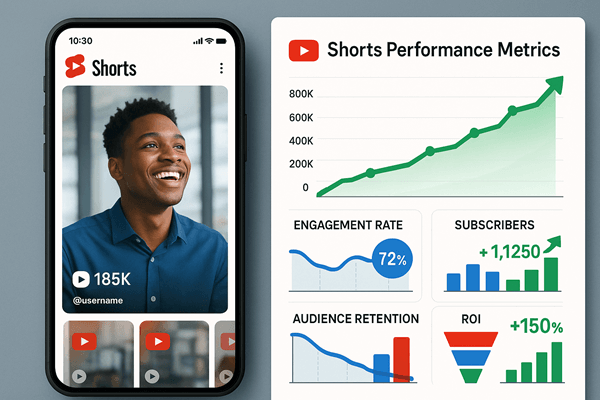
YouTube Studio provides detailed analytics for Shorts:
- Average view duration (aim for 80%+ retention)
- Traffic sources (Shorts feed vs. browse features vs. search)
- Audience demographics (age, gender, geography)
- Engagement metrics (likes, comments, shares)
Review these metrics weekly. Double down on what works. Kill what doesn’t. The data tells you exactly what your audience wants—listen to it.
Hooks and Pattern Interrupts
The scroll is your enemy. You need pattern interrupts that make thumbs stop mid-swipe.
Effective hooks include:
- Contrarian statements: “Stop doing [common practice]”
- Curiosity gaps: “The one thing nobody tells you about…”
- Visual surprises: Unexpected movements or transformations
- Direct questions: “Are you making this mistake?”
Test different hooks on similar content to see what resonates with your audience.
Series and Continuity
Create connected Shorts that reference each other. “Part 1,” “Part 2” structures keep viewers coming back to your channel for the next installment.
This strategy also trains the algorithm to recognize that viewers who watch one of your Shorts are likely to watch others, increasing your overall distribution.
Conclusion
The YouTube Shorts aspect ratio of 9:16 at 1080×1920 pixels isn’t just a technical specification. It’s your entry ticket to one of the most powerful content distribution systems ever created.
Get it wrong, and your content gets buried. Get it right, and you unlock access to billions of potential viewers.
But here’s the thing: technical perfection means nothing without compelling content. The aspect ratio gets you in the door. Your storytelling, value proposition, and execution determine whether you succeed.
Your next steps:
- Audit your existing content. Identify horizontal videos that could be reformatted or repurposed as Shorts.
- Set up your recording workflow. Whether you’re shooting on a phone or using professional equipment, establish a process that consistently delivers 9:16 content.
- Create your first batch. Don’t overthink it. Shoot 5-10 Shorts this week and start learning from real data.
- Analyze and iterate. Review your analytics after two weeks and adjust your approach based on what the data reveals.
- Scale what works. Once you identify winning formats and topics, double down and increase production volume.
The creators and brands winning with YouTube Shorts right now aren’t necessarily the most talented or well-funded. They’re the ones who understood the technical requirements, committed to consistent execution, and adapted based on performance data.
The YouTube Shorts aspect ratio is your foundation. Build your empire on it.



1 Response to "YouTube Shorts Aspect Ratio: Making Your Videos a Success"
Thank you for your sharing. I am worried that I lack creative ideas. It is your article that makes me full of hope. Thank you. But, I have a question, can you help me?