You’ve found the perfect TikTok video for your content strategy. Maybe it’s a trending sound you want to analyze, a competitor’s viral moment, or inspiration for your next campaign.
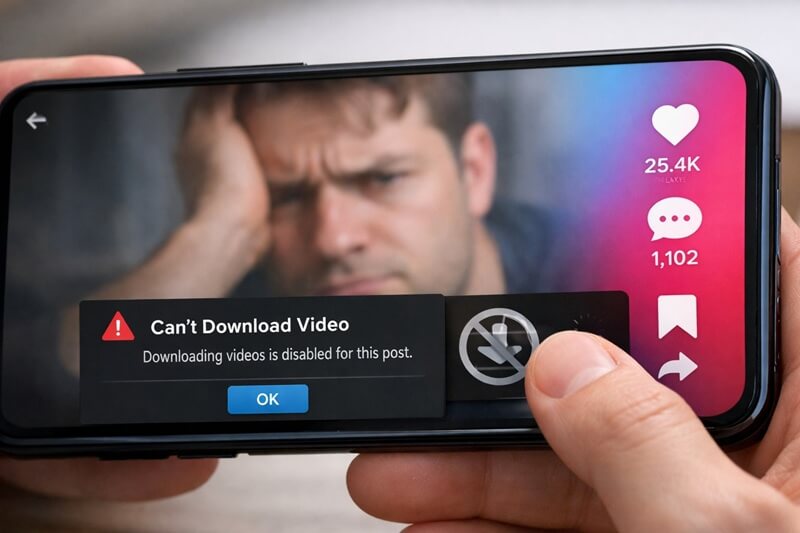
You hit that download button and… nothing happens. Or worse, the button isn’t even there.
Frustrating, right?
Why can’t I download TikTok videos when the platform literally has a download feature built in?
The answer isn’t always straightforward, and it’s costing marketers and content creators valuable time and resources. Let’s break down exactly what’s happening and how to fix it.
Key Takeaways
- Creator privacy settings are the #1 reason you can’t download TikTok videos—creators can disable downloads entirely
- Copyright-protected music automatically blocks the download function, even if the creator allows downloads
- Business and Pro accounts may have different download restrictions compared to personal accounts
- App version and device issues can prevent downloads even when everything else is configured correctly
- Alternative solutions exist for downloading TikTok content legally and ethically for your marketing needs
Understanding TikTok’s Built-In Download Feature
TikTok wants you to download videos. Sounds contradictory, right? The platform includes a native download feature because it encourages sharing and increases reach.
When users download and repost content elsewhere, TikTok’s watermark goes along for the ride. It’s free advertising.
But here’s the catch: TikTok gives creators full control over whether their content can be downloaded.
The download button appears as a share option on every video (when enabled). Tap the arrow icon on the right side of the screen, and you’ll see “Save video” among the sharing options. Simple enough. Except when it’s not there.
Why Can’t I Download TikTok Videos? The Main Culprits
Creator Privacy Settings Block Downloads
This is the most common reason. Creators can toggle off downloads in their privacy settings with a single switch. When disabled, the download option doesn’t appear for viewers.
Why would creators do this? Several reasons:
- Protecting original content from being stolen or reposted without credit
- Maintaining exclusivity for their brand or personal account
- Preventing misuse of their image or content
- Controlling distribution of sponsored or branded content
Many influencers and businesses disable downloads by default. They’ve worked hard to create that content, and they don’t want it floating around without proper attribution.
Copyright-Protected Music Ruins Everything
Even if a creator allows downloads, copyrighted music automatically disables the feature. TikTok’s licensing agreements don’t extend to downloaded content, so the platform blocks downloads entirely when commercial music is detected.
You’ll know this is the issue when you see the download option grayed out or missing, but other videos from the same creator download just fine. The difference? The audio track.
This affects a huge percentage of TikTok content. Most viral videos use trending sounds and most trending sounds are copyrighted music.
Account Type Matters More Than You Think
Business accounts and Creator accounts have different rules than personal accounts. If you’re trying to download from a business profile, you might encounter additional restrictions.
TikTok treats commercial content differently. Brands often have stricter controls over their intellectual property, and the platform respects those boundaries.
Technical Glitches and App Issues
Sometimes it’s not about permissions at all. Outdated app versions, corrupted cache files, or device-specific bugs can prevent downloads even when everything should work.
Common technical issues include:
- Running an old version of the TikTok app
- Insufficient storage space on your device
- Corrupted app cache or data
- Network connectivity problems during download
- iOS or Android system conflicts
Troubleshooting: Why Can’t I Download TikTok Videos Right Now?
Let’s get practical. Here’s how to diagnose and fix the problem.
Check the Creator’s Settings First
This is your starting point. If the download option doesn’t appear at all, the creator has disabled it. There’s no workaround within TikTok’s native features. Period.
You can verify this by checking other videos from the same creator. If none of them offer downloads, it’s a privacy setting issue.
Identify Copyright Issues
Look at the sound credit at the bottom of the video. If it shows a commercial song title and artist, that’s your answer. The music is copyrighted, and TikTok won’t let you download it.
Videos with original sounds or royalty-free music typically don’t have this restriction.
Update Your TikTok App
When was the last time you updated? If you’re like most people we know, you don’t update your apps that often.
Go to your app store and check for TikTok updates. Bug fixes and feature improvements happen regularly, and an outdated version might be causing your download problems.
Clear Cache and Restart
This fixes more problems than you’d expect:
- Go to your TikTok profile
- Tap the three-line menu (top right)
- Select Settings and Privacy
- Navigate to Cache & Cellular Data
- Clear cache
- Force close the app
- Restart your device
Sounds basic, but it works.
Check Your Storage Space
If your device is nearly full, downloads will fail. TikTok needs space to save the video file. Check your storage and delete unnecessary files if needed.
Why You May Need to Download TikTok Videos
Understanding short-form video creation is crucial for modern marketing strategies. But sometimes you need to download existing content for legitimate business purposes.
Valid reasons include:
- Competitor analysis – studying what works in your niche
- Trend research – identifying patterns and viral elements
- Content inspiration – understanding successful formats and styles
- Performance benchmarking – comparing your content against top performers
- Educational purposes – learning from successful creators
For small business owners and startup founders, analyzing successful TikTok content can inform your entire short-form video strategy.
Legal and Ethical Alternatives When You Can’t Download
When TikTok’s native download won’t work, you have options. But tread carefully—respecting copyright and creator rights isn’t optional.
Screen Recording (With Caveats)
Most devices allow screen recording. This captures the video as it plays, watermark and all.
Important: This is only acceptable for:
- Personal reference and study
- Fair use analysis
- Content you have permission to use
Never repost screen-recorded content without explicit permission from the creator.
Third-Party Download Tools
Numerous websites and apps claim to download TikTok videos. Some work, some don’t, and some are downright sketchy.
If you go this route:
- Only use reputable services
- Never enter your TikTok login credentials
- Respect creator rights and copyright
- Use downloaded content ethically
Remember: just because you can download something doesn’t mean you should repost it.
Ask for Permission
Revolutionary concept, right? If you want to use someone’s content, ask them.
Most creators are flattered when you reach out professionally. Explain how you want to use their video, offer proper credit, and respect their decision. Many will say yes, especially if you’re not a direct competitor.
Creating Your Own Content Instead
Here’s a thought: instead of downloading others’ videos, create your own.
Platforms like QuickVid make it ridiculously easy to produce professional short-form content without the headaches of downloading, permissions, and copyright issues. You control everything, own the rights, and never have to worry about creator settings blocking your workflow.
For marketers juggling multiple campaigns, this approach saves time and eliminates legal gray areas. Plus, original content performs better than reposts anyway.
Learning how to create engaging social media hooks and understanding how often you should post on TikTok will serve you better than downloading competitors’ videos ever could.
The Download Settings You Control
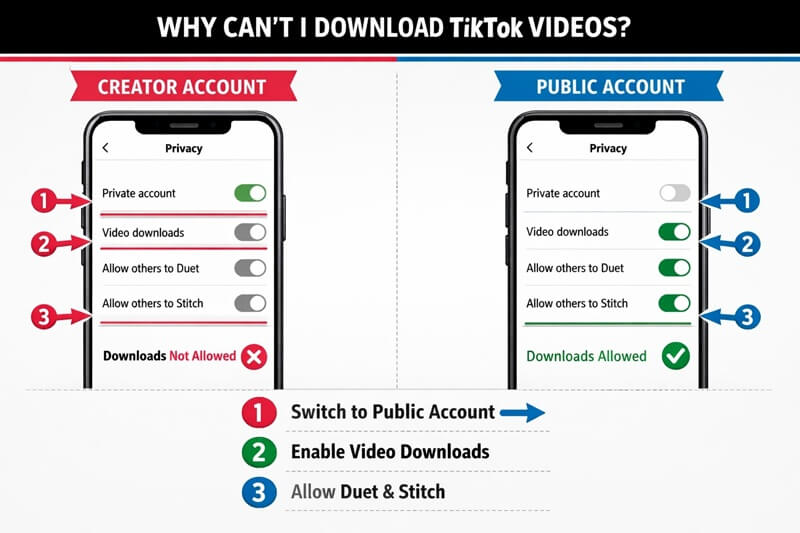
While you can’t force others to let you download their content, you can manage your video settings.
How to Enable Downloads on Your Videos
If you’re a creator, here’s how to allow downloads:
- Open TikTok and go to your profile
- Tap the three-line menu icon
- Select “Settings and Privacy”
- Choose “Privacy”
- Scroll to “Downloads”
- Toggle on “Video downloads”
That’s it. Now viewers can save your content.
Why You Might Want to Disable Downloads
On the flip side, disabling downloads makes sense when:
- You’re posting exclusive content for your audience
- The video contains proprietary business information
- You’re concerned about content theft
- You’ve created sponsored content with usage restrictions
- You want to maintain tighter control over distribution
There’s no right answer. It depends on your goals and content strategy.
When Download Issues Signal Bigger Problems
Sometimes, persistent download problems indicate account or device issues beyond a simple setting.
Red flags to watch for:
- Can’t download ANY videos, even those from creators who allow it
- Download option disappeared suddenly across all content
- App crashes when attempting downloads
- Error messages that won’t resolve
These suggest:
- Your account may have restrictions or violations
- Your device has corrupted TikTok data
- Your app installation is damaged
- Your operating system has compatibility issues
In these cases, try reinstalling TikTok completely or contacting TikTok support.
Best Practices for Content Sourcing
Whether you can download videos or not, follow these principles:
Always prioritize ethical content use:
- Give credit where credit is due
- Seek permission for commercial use
- Respect copyright and intellectual property
- Use downloads for reference and learning, not theft
- Create transformative content, not copies
Build relationships with creators:
- Engage authentically with content you admire
- Collaborate instead of copying
- Share and promote creators you feature
- Compensate creators fairly for usage rights
The TikTok community values authenticity and originality. Your reputation matters more than any single video download.
Conclusion: Moving Forward When Downloads Don’t Work
So, why can’t I download TikTok videos? Usually, because the creator disabled it, the audio is copyrighted, or you’re experiencing a technical glitch. Sometimes all three.
The good news? You don’t need to download others’ content to succeed on TikTok. Focus your energy on creating original videos that showcase your brand, products, or expertise. Use the platform’s native features, respect creator rights, and build your own content library.
Your next steps:
- Troubleshoot your specific download issue using the methods above
- Evaluate whether you actually need to download content or just reference it
- Explore content creation tools that eliminate download dependency
- Develop an original content strategy that sets you apart
- Connect with creators for legitimate collaborations
Ready to create viral-worthy content without the download drama? Check out QuickVid’s platform and see how easy professional video creation can be.