You’ve spent hours creating the perfect TikTok video. The content is fire, the editing is tight, and you’re ready to go viral.
But when you upload it, there are ugly black bars on the sides. Or worse, your video gets cropped, cutting off the most important parts.
The culprit? Wrong aspect ratio.
Getting the TikTok aspect ratio right isn’t just about aesthetics. It’s about maximizing your screen real estate, keeping viewers engaged, and making sure your content looks professional.
TikTok continues to dominate the social media landscape, and understanding video dimensions has become non-negotiable for creators and marketers.
Let’s break down what you need to know about TikTok’s aspect ratio so your videos always look their best.

Key Takeaways
- TikTok’s ideal aspect ratio is 9:16 (vertical/portrait orientation) with recommended dimensions of 1080×1920 pixels
- Using the correct aspect ratio ensures your video fills the entire screen without black bars or unwanted cropping
- Horizontal videos (16:9) will display with black bars and won’t perform as well on the platform
- Different content types may require slight adjustments, but vertical format always wins on TikTok
- Tools like QuickVid can automatically format your videos to the perfect TikTok specifications
What Is the TikTok Aspect Ratio?
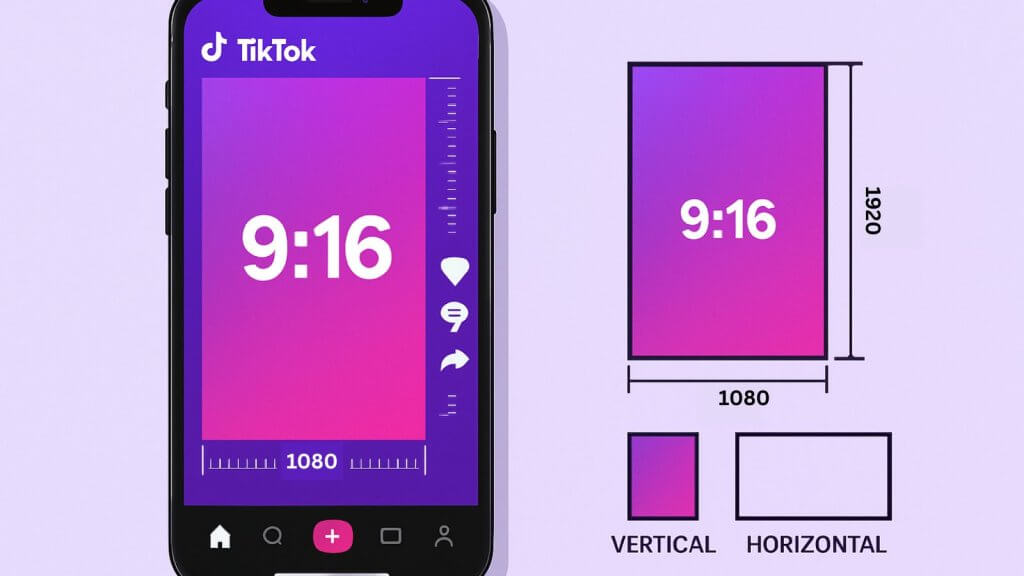
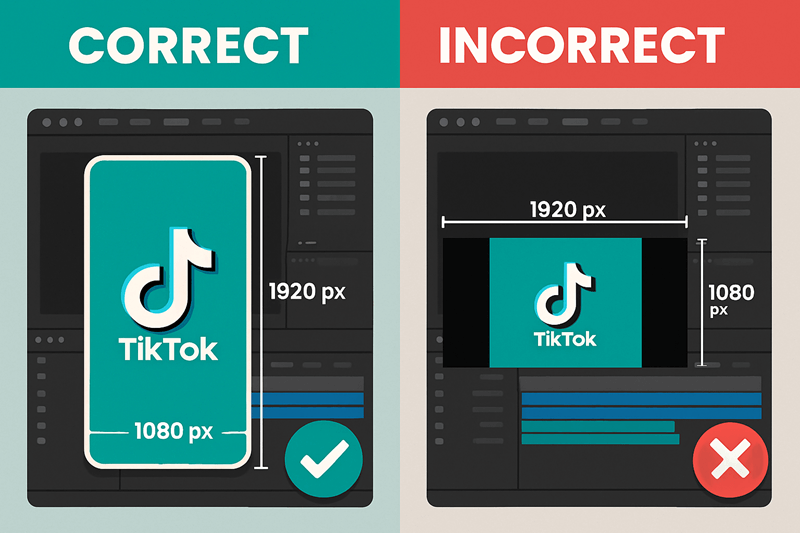
The TikTok aspect ratio is 9:16. This means for every 9 units of width, your video should have 16 units of height. It’s a vertical, portrait-oriented format that matches how people naturally hold their phones.
In pixel dimensions, that translates to 1080 pixels wide by 1920 pixels tall. This is the sweet spot that fills a smartphone screen completely without any cropping or letterboxing.
Why does this matter?
TikTok is a mobile-first platform. Over 90% of users access it on their phones. When you upload a video in the wrong aspect ratio, TikTok either adds black bars (making your content look amateur) or crops it (potentially cutting off important visual elements).
Understanding Aspect Ratios
Think of aspect ratio as the relationship between width and height. Here’s how TikTok compares to other common formats:
| Platform | Aspect Ratio | Orientation | Best For |
| TikTok | 9:16 | Vertical | Mobile viewing |
| YouTube | 16:9 | Horizontal | Desktop/TV viewing |
| Instagram Feed | 1:1 or 4:5 | Square/Vertical | Mobile feed |
| Instagram Reels | 9:16 | Vertical | Mobile viewing |
| 16:9 or 1:1 | Horizontal/Square | Mixed viewing |
TikTok’s vertical format isn’t arbitrary. It’s designed for thumb-scrolling, one-handed viewing, and immersive full-screen experiences.
Why the Correct TikTok Aspect Ratio Matters
Using the right aspect ratio isn’t just technical nitpicking. It directly impacts your performance on the platform.
Viewer Experience When your video fills the entire screen, viewers stay immersed in your content. There’s nothing to distract them, no black bars, no awkward cropping, no visual interruptions. Just your message, front and center.
Algorithm Favorability TikTok’s algorithm prioritizes watch time and completion rates. Videos that look professional and fill the screen tend to keep viewers watching longer. That signals to the algorithm that your content is engaging, which means more distribution.

Professional Appearance Black bars scream “I don’t know what I’m doing.” They make your content look like you just uploaded whatever you had without considering the platform. In contrast, properly formatted videos show you’re serious about your craft.
Mobile Optimization Since TikTok is mobile-first, vertical videos feel natural. Users don’t have to rotate their phones or squint at tiny horizontal videos. You’re working with the platform, not against it.
For marketers and businesses, this becomes even more critical. Your brand’s credibility is on the line with every video you post. Getting the basics right (with things like aspect ratio) builds credibility.
Recommended TikTok Video Dimensions
Let’s get specific. Here are the exact dimensions you should aim for:
Optimal Specifications:
- Aspect Ratio: 9:16
- Resolution: 1080 x 1920 pixels
- Minimum Resolution: 640 x 640 pixels
- File Size: Up to 287.6 MB (iOS) or 72 MB (Android)
- Video Length: 3 seconds to 10 minutes
- File Format: .mp4 or .mov
The 1080 x 1920 resolution gives you crisp, high-definition quality that looks great on modern smartphones.
While TikTok accepts lower resolutions, they’ll appear pixelated and unprofessional on newer devices. There’s also a minimum resolution that TikTok will accept.
What Happens If You Use the Wrong Dimensions?
If you upload a horizontal video (16:9), TikTok will add black bars on the top and bottom. Your content gets squeezed into the middle of the screen, wasting valuable real estate.
If you upload a square video (1:1), you’ll get black bars on the sides. Better than horizontal, but still not ideal.
If you upload a video with odd dimensions, TikTok will crop it to fit. This might cut off faces, text, or important visual elements. Not good.
The solution?
Always shoot or edit in 9:16 from the start. If you’re repurposing content from other platforms, you’ll need to reformat it specifically for TikTok.
Creating Content with the Perfect TikTok Aspect Ratio
Now that you know the specs, how do you actually create videos with the right aspect ratio?
Shooting Natively for TikTok
The easiest approach is to shoot directly in the TikTok app. When you open the camera, it automatically records in 9:16. No thinking required.
But if you’re using an external camera or smartphone camera app:
- Set your camera to portrait mode before you start recording
- Frame your shots vertically with the subject centered
- Leave headroom at the top and bottom for text overlays
- Consider the safe zones where TikTok’s UI elements appear
Many creators make the mistake of shooting horizontally “just in case” they want to use the footage elsewhere. Don’t do this. Shoot for the platform you’re posting on. If you need the content for YouTube later, shoot separate footage.
Yes, this is easier said than done, but it’s important to give yourself the best chance of success.
Editing for TikTok
If you’re editing on your computer or using professional software, you’ll need to set up your project correctly:
In Most Video Editing Software:
- Create a new project/sequence
- Set custom dimensions to 1080 x 1920
- Set frame rate to 30fps (or 60fps for smoother motion)
- Import your footage and arrange it vertically
Popular editing apps like CapCut, Adobe Premiere Pro, and Final Cut Pro all support custom aspect ratios. Just make sure you’re exporting at the right dimensions when you’re done.
Using Automated Tools
Here’s where things get easier. Platforms like QuickVid specialize in creating short-form videos that are automatically formatted for TikTok and other social platforms.
These tools handle the aspect ratio for you, so you don’t have to worry about technical specifications. You focus on the content, and the software ensures it’s optimized for maximum engagement. This is especially valuable if you’re creating multiple videos or automating your TikTok content.
Common TikTok Aspect Ratio Mistakes to Avoid
Even experienced creators make these errors. Here’s what to watch out for:
❌ Mistake #1: Repurposing YouTube Videos Directly
YouTube videos are 16:9 (horizontal). If you just upload them to TikTok, they’ll look terrible. You need to either:
- Crop them to vertical (losing content on the sides)
- Add backgrounds to fill the vertical space
- Shoot separate vertical versions
❌ Mistake #2: Ignoring Text Placement
TikTok’s interface includes captions, profile info, and buttons that overlay your video. If you place important text too low, it’ll get covered by the caption bar. Keep text in the upper two-thirds of your frame.
❌ Mistake #3: Using 1:1 Square Videos
Square videos work great for Instagram feed posts, but they’re suboptimal for TikTok. You’re wasting screen space with black bars. Always go vertical.
❌ Mistake #4: Not Testing Before Posting
Always preview your video in TikTok before publishing. What looks good in your editing software might have issues when uploaded. Check for cropping, clarity, and text visibility.
❌ Mistake #5: Forgetting About Safe Zones
The TikTok interface covers parts of your video with UI elements. Keep your subject and important information in the center of the frame, away from the edges where buttons and text appear.
Advanced Tips for TikTok Aspect Ratio Optimization
Once you’ve mastered the basics, these advanced techniques will take your content to the next level.
Leverage the Full Vertical Canvas
Don’t just center your subject and call it a day. Use the entire vertical space creatively:
- Top third: Attention-grabbing headline or hook
- Middle third: Main subject or action
- Bottom third: Supporting visuals or context
This creates visual hierarchy and guides the viewer’s eye through your content.
Create Platform-Specific Content
Stop trying to make one video work everywhere. Create TikTok-specific content that takes advantage of the vertical format. Think about how people consume content on TikTok—quickly, casually, and on mobile.
Use Templates and Presets
Most editing software lets you save aspect ratio presets. Create a “TikTok” preset at 1080 x 1920 so you don’t have to set it up every time. This saves time and prevents errors.
If you’re creating content at scale, consider using automated short-form video creation tools that handle formatting automatically.
Consider Multi-Platform Strategies
While you should create native content for TikTok, you might want to repurpose it elsewhere. Here’s a smart workflow:
- Shoot in 9:16 for TikTok (your primary format)
- Keep important elements in the center of the frame
- When repurposing for YouTube Shorts or Instagram Reels, the video already works (they use 9:16 too)
- For the YouTube main feed, you’ll need to crop or reshoot
This approach prioritizes mobile-first platforms while keeping your options open.
Tools and Resources for Perfect TikTok Videos
You don’t need expensive equipment to create properly formatted TikTok videos. Here are some tools that make the process easier:
Mobile Apps:
- TikTok’s native editor (free, built-in)
- CapCut (free, powerful editing)
- InShot (free with paid features)
Desktop Software:
- Adobe Premiere Pro (professional, subscription-based)
- Final Cut Pro (professional, one-time purchase)
- DaVinci Resolve (free version available)
Automated Platforms:
- QuickVid (automated video creation with proper formatting)
- Various AI-powered video tools that understand platform requirements
The right tool depends on your workflow, budget, and technical skills. Beginners can start with free mobile apps, while professionals might prefer desktop software. And if you’re managing multiple accounts or creating high volumes of content, automation tools become invaluable.
TikTok Aspect Ratio FAQs
Can I post horizontal videos on TikTok? Technically yes, but you shouldn’t. Horizontal videos will have black bars and won’t perform as well. The algorithm and viewers both prefer vertical content.
What if I only have horizontal footage? You have a few options: crop it to vertical (losing the sides), add a blurred background to fill the vertical space, or overlay the horizontal video on a vertical canvas with graphics. None are ideal, but they’re better than black bars.
Does TikTok support 4K resolution? TikTok compresses videos during upload, so shooting in 4K won’t give you 4K output. Stick with 1080 x 1920 for the best balance of quality and file size.
How often should I post on TikTok? While this isn’t directly about aspect ratio, consistency matters more than frequency. Learn more about how often you should post on TikTok to maximize your reach.
Conclusion: Master the TikTok Aspect Ratio for Better Results
Getting the TikTok aspect ratio right is one of the simplest ways to improve your content’s performance. It’s not complicated—just shoot or edit in 9:16 (1080 x 1920 pixels), and you’re good to go.
But the impact is significant. Properly formatted videos look professional, keep viewers engaged, and signal to the algorithm that you understand the platform. In a space where everyone’s competing for attention, these details matter.
The creators who succeed on TikTok aren’t necessarily the ones with the biggest budgets or fanciest equipment. They’re the ones who understand the platform and optimize for it. Aspect ratio is just one piece of the puzzle, but it’s a foundational one.