Have you ever stumbled upon the perfect audio clip on Instagram? It could be a catchy song snippet, a motivational speech, or a hilarious sound bite. Then, you wished you could save it for later?
You’re not alone.
Instagram audio download has become one of the most searched-for features as content creators and marketers look for ways to repurpose engaging audio across their social media platforms.
The truth is, Instagram doesn’t make it easy to download audio directly. But that doesn’t mean it’s impossible.
This guide walks through everything you need to know about Instagram audio download, from understanding why you’d want to save audio in the first place to the practical methods.
Key Takeaways
- Instagram doesn’t offer a native audio download feature, but several workarounds exist for saving audio from posts and Reels
- Third-party tools and apps can extract audio from Instagram videos, though quality and safety vary significantly
- Understanding Instagram’s copyright policies is crucial before downloading and reusing any audio content
- Downloaded audio can be repurposed for automated short-form video creation across multiple platforms
- Screen recording with audio capture provides a simple alternative when other methods fail
Why Download Audio from Instagram?
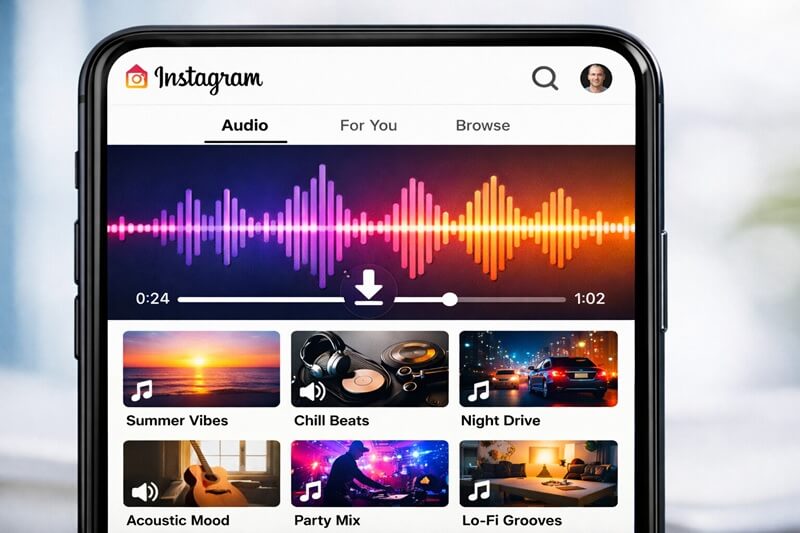
Before diving into the how, let’s talk about the why. Instagram has become a goldmine for audio content. Trending sounds drive engagement. They make Reels go viral and help content reach new audiences.
Here’s what makes Instagram audio so valuable:
Content Repurposing: That perfect audio clip from Instagram might work brilliantly on TikTok, YouTube Shorts, or your next marketing campaign. Creators constantly adapt content across platforms to maximize reach.
Trend Analysis: Marketers and influencers download trending audio to study what’s working. Understanding audio trends helps predict what might perform well for your brand.
Backup and Archiving: Sometimes you create original audio for your Instagram content and want a backup. Or you’ve collaborated with someone and need to save the final audio file.
Educational Content: Podcasters, educators, and trainers often find valuable audio snippets worth preserving for future reference or incorporation into presentations.
The demand is real. But Instagram’s closed ecosystem makes audio extraction tricky by design.
Understanding Instagram’s Audio Ecosystem
Instagram’s audio landscape has evolved significantly. The platform now features:
- Original Audio: Content creators can record and upload their sounds
- Licensed Music: Instagram’s music library offers thousands of licensed tracks
- Trending Sounds: Audio clips that gain popularity across the platform
- Audio Remixes: Users can layer and modify existing sounds
Each type comes with different usage rights and download considerations. Licensed music, for instance, carries strict copyright protections. Original audio created by users falls under different rules.
Instagram intentionally limits audio downloads to protect intellectual property rights and maintain platform exclusivity. This creates challenges for legitimate use cases while preventing unauthorized distribution.
Methods for Instagram Audio Download
Here are the methods that actually work for downloading audio from Instagram. Choose the one that works best for you.
Method 1: Third-Party Download Tools
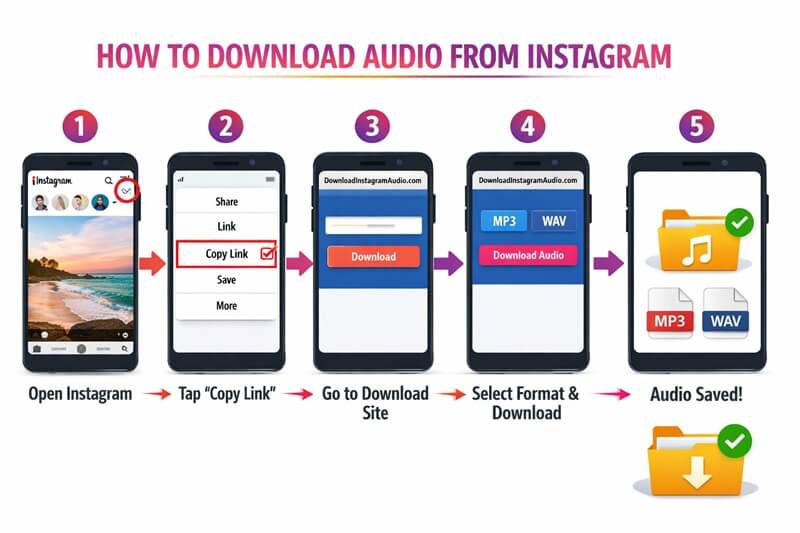
Several online tools specialize in extracting audio from Instagram content. These typically work by:
- Copying the Instagram post or Reel URL
- Pasting it into the download tool
- Selecting audio-only format
- Downloading the extracted file
Popular options include:
- SnapInsta
- SaveFrom.net
- InstaDownloader
- DownloadGram
These tools vary in quality and reliability. Some extract clean audio files, while others include watermarks or reduced quality. Always verify the tool’s reputation before entering any Instagram credentials.
⚠️ Important: Never provide your Instagram password to third-party download sites. Legitimate tools don’t require login credentials.
Method 2: Screen Recording with Audio Capture
This method works universally across devices but it requires a bit more effort depending on the device you’re using:
On iPhone:
- Enable microphone in Screen Recording settings
- Play the Instagram video
- Start screen recording
- Extract audio from the video file using editing software
On Android:
- Use built-in screen recorder or download a reputable app
- Ensure audio recording is enabled
- Play the Instagram content
- Save and extract audio from the recording
Screen recording captures exactly what plays on your device. The quality matches what Instagram streams, making it a reliable fallback option.
Method 3: Browser Extensions
Chrome and Firefox extensions can intercept media files as they load. Extensions like:
- Video DownloadHelper
- Flash Video Downloader
- Helper for Instagram
These extensions detect audio and video streams, offering download options directly in your browser. They’re convenient but require careful vetting for security.
Pro tip: Only install extensions from official browser stores with verified publishers and positive reviews.
Method 4: Developer Tools Method
For tech-savvy users, browser developer tools provide direct access to media files:
- Open Instagram in a desktop browser
- Right-click and select “Inspect” or press F12
- Navigate to the Network tab
- Play the video/audio content
- Filter by media type
- Locate and download the audio file
This method requires technical knowledge but offers the most direct access to source files without third-party tools.
Instagram Audio Download: Quality and Format Considerations
Downloaded audio quality depends on several factors:
Source Quality: Instagram compresses audio to optimize streaming. The original upload quality matters, but Instagram’s compression sets the ceiling for what you can download.
Download Method: Different tools preserve quality differently. Some re-encode audio, further reducing quality. Direct extraction methods typically preserve the best quality available.
File Formats: Most Instagram audio downloads as:
- MP3: Most common, good compatibility
- AAC: Better quality at similar file sizes
- M4A: Apple-friendly format with good compression
| Format | Quality | Compatibility | File Size |
| MP3 | Good | Excellent | Medium |
| AAC | Better | Very Good | Medium |
| M4A | Better | Good (Apple) | Smaller |
| WAV | Best | Good | Large |
For professional use, aim for the highest bitrate available. For social media repurposing, standard quality usually suffices.
Legal and Ethical Considerations
Here’s where things get serious. Copyright matters.
Instagram’s Terms of Service prohibit downloading content without permission. But the legal landscape is nuanced:
Fair Use Scenarios:
- Educational purposes
- Commentary and criticism
- Transformative works
- Limited excerpts for review
Prohibited Uses:
- Redistributing copyrighted music
- Commercial use without licensing
- Claiming others’ original audio as your own
- Violating Instagram’s Terms of Service
Before downloading and using any Instagram audio:
- Check if it’s original or licensed content
- Contact the creator for permission when possible
- Understand your intended use case
- Consider licensing requirements for commercial projects
The safest approach? Download only content you created or have explicit permission to use. When in doubt, reach out to the original creator.
Using Downloaded Instagram Audio in Your Content
Once you’ve legally obtained audio from Instagram, the creative possibilities expand. Here’s how content creators are leveraging downloaded audio:
Cross-Platform Content Strategy: That trending Instagram sound might perform equally well on TikTok or YouTube Shorts. Creating short-form video content across platforms requires adapting audio to different formats and audiences.
Background Music for Videos: Downloaded audio clips can enhance your video content. Layer them with voiceovers, adjust volume levels, and sync them to visual elements.
Podcast Intros and Outros: Catchy audio snippets make memorable podcast elements. Just ensure you have proper rights before using them commercially.
Marketing Campaigns: Audio branding creates recognition. Consistent sound elements across your marketing materials strengthen brand identity.
Educational Content: Incorporating relevant audio examples into training materials or presentations adds engagement and context.
When repurposing audio, always edit thoughtfully. Trim unnecessary portions, adjust levels, and ensure the audio enhances rather than distracts from your message. Tools like QuickVid can help streamline the process of creating engaging video content with your downloaded audio.
Best Practices for Instagram Audio Download
Follow these guidelines to download Instagram audio safely and effectively:
🔒 Security First
- Only use reputable download tools
- Avoid sites requiring Instagram login
- Keep antivirus software updated
- Don’t install suspicious browser extensions
📱 Quality Preservation
- Download from the highest quality source available
- Avoid multiple re-compressions
- Save original files before editing
- Use lossless formats when possible
⚖️ Legal Compliance
- Respect copyright and intellectual property
- Obtain permissions for commercial use
- Credit original creators when appropriate
- Follow platform Terms of Service
🔄 Workflow Integration
- Test downloads before relying on them
- Have backup methods ready
- Keep tools and software updated
- Document your process for consistency
These practices protect both your devices and your reputation while ensuring you can reliably access the audio content you need.
Alternatives to Downloading Instagram Audio
Sometimes downloading isn’t necessary—or isn’t the best solution. Consider these alternatives:
Instagram’s Built-In Features: Use Instagram’s native audio library for own Reels. The platform offers thousands of licensed tracks you can use freely within Instagram.
Royalty-Free Music Libraries: Platforms like Epidemic Sound, Artlist, and AudioJungle provide high-quality audio specifically licensed for content creation. No download workarounds needed.
Original Audio Creation: Creating your own sounds gives you complete control and ownership. Record voiceovers, music, or sound effects tailored to your brand.
Collaboration with Creators: Reach out to Instagram creators directly. Many are happy to share audio files or collaborate on projects, especially if you credit them properly.
Stock Audio Platforms: Services like YouTube Audio Library, Free Music Archive, and Incompetech offer free, downloadable audio for various uses.
These alternatives often provide better quality, clearer licensing, and less hassle than trying to extract audio from Instagram posts.
Troubleshooting Common Instagram Audio Download Issues
Even with the right tools, you might encounter problems. Here’s how to solve common issues:
Problem: Download Tool Isn’t Working
- Try a different tool or method
- Check if Instagram updated their system
- Verify the URL is correct and complete
- Clear browser cache and cookies
Problem: Audio Quality Is Poor
- Download from desktop instead of mobile
- Try a different extraction tool
- Check if the source quality is low
- Avoid tools that re-compress audio
Problem: File Won’t Play
- Check the file format compatibility
- Try converting to a different format
- Ensure the download completed fully
- Test with different media players
Problem: Copyright Claims
- Verify you have usage rights
- Consider using royalty-free alternatives
- Reach out to the original creator
- Consult with legal counsel for commercial use
When technical solutions fail, remember that screen recording with audio capture almost always works as a reliable backup method.
Conclusion: Making Instagram Audio Download Work for You
Instagram audio download isn’t straightforward by design, but it’s possible with the right approach. Whether you’re using third-party tools, screen recording, or browser extensions, you now have multiple methods to save audio from Instagram.
Remember the key principles:
✅ Always respect copyright and intellectual property
✅ Use reputable tools that don’t compromise security
✅ Prioritize quality preservation in your downloads
✅ Consider alternatives when downloading isn’t necessary
✅ Stay updated on platform changes and best practices
The most successful content creators don’t just download audio. They use it strategically. They understand their audience, respect legal boundaries, and create value with every piece of content they produce.
Whether you’re building a faceless YouTube channel, creating Instagram Reels, or developing a comprehensive social media strategy, quality audio makes a measurable difference. The tools are at your fingertips. The methods are proven. Now it’s time to put this knowledge into action and create content that stands out.