YouTube Shorts has exploded. With over 70 billion daily views, these bite-sized vertical videos are reshaping how creators connect with audiences.
But here’s the thing: knowing how to make a YouTube Short that performs isn’t just about hitting record on your phone. It’s about understanding the format, optimizing for the algorithm, and creating content that stops the scroll.
Whether you’re a marketer testing new channels or a creator looking to expand your reach, this guide breaks down everything you need to create Shorts that convert viewers into subscribers.
Key Takeaways
- YouTube Shorts must be 60 seconds or less in vertical 9:16 format to qualify for the Shorts feed and algorithm (that has now been extended to 180 seconds)
- The #Shorts hashtag in your title or description helps YouTube categorize your video correctly and boost discoverability
- Automation tools and AI platforms can streamline Short creation by repurposing long-form content and generating multiple videos quickly
- Captions, stickers, and strategic editing significantly increase engagement and watch time on Shorts
- Titles under 40 characters prevent truncation on mobile devices and improve click-through rates

What Exactly Is a YouTube Short?
YouTube Shorts are vertical videos designed specifically for mobile viewing. They’re YouTube’s answer to TikTok and Instagram Reels.
Here’s what qualifies as a Short:
- Maximum duration: 60 seconds or less (can be extended to 180 seconds)
- Aspect ratio: 9:16 (vertical format)
- Resolution: Optimized for mobile screens
- Placement: Appears in the dedicated Shorts feed and shelf
The format prioritizes quick consumption. No fluff. Just engaging content that delivers value fast. You can create normal videos as shorts or faceless videos.
Unlike traditional YouTube videos, Shorts don’t require elaborate intros or lengthy explanations. They thrive on immediacy. Think of them as visual hooks that pull viewers into your content ecosystem.
Understanding YouTube Shorts Requirements
Before you start filming, you need to know the technical specs. Miss these, and your video won’t qualify as a Short.
Technical Specifications
| Requirement | Specification |
| Duration | 60 seconds (up to a maximum of 180 seconds) |
| Aspect Ratio | 9:16 (vertical) |
| Resolution | 1920 x 1080 pixels recommended |
| File Format | MP4 or MOV |
| Hashtag | #Shorts in title or description |
The 9:16 aspect ratio is non-negotiable. This vertical format ensures your Short displays properly on mobile devices without black bars or cropping issues.
Content Guidelines
YouTube’s algorithm looks for specific signals to identify Shorts:
- Videos under 60 seconds
- Vertical orientation
- The #Shorts hashtag (highly recommended)
- Mobile-first composition
You’ll also need to set audience settings correctly. If your content targets children, you must mark it as “made for kids” to comply with COPPA regulations. This affects what features you can use, so choose carefully.
How to Make a YouTube Short Using the Mobile App
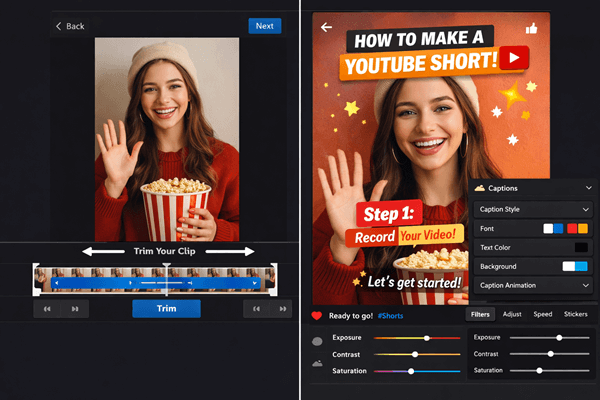
The YouTube mobile app makes creating Shorts ridiculously simple. Here’s the step-by-step process.
Step 1: Open the Shorts Camera
- Open the YouTube app on your phone
- Tap the + button at the bottom
- Select Create a Short
The Shorts camera launches in vertical mode automatically. No need to flip your phone or adjust settings.
Step 2: Record Your Content
You’ve got two recording options:
Single-take recording: Press and hold the red record button for one continuous clip (up to 60 seconds).
Multi-segment recording: Tap the record button to start, tap again to pause. This lets you create multiple clips that combine into one Short. The app supports up to 3 minutes of raw footage, which you can trim down.
Pro tip: Use multi-segment recording to eliminate awkward pauses and create jump cuts without editing software.

Step 3: Add Creative Elements
After recording, YouTube offers built-in editing tools:
- Text overlays: Add captions or emphasis
- Filters: Adjust color and mood
- Music: Browse YouTube’s audio library
- Speed controls: Slow down or speed up footage
- Auto-captions: Generate subtitles automatically (just basic captions, if you need something more advanced, try QuickVid)
With the auto-caption, you can adjust style, color, size, and position to match your brand. Since 85% of social videos are watched without sound, captions dramatically boost engagement.
Step 4: Optimize Before Publishing
Before you hit upload:
- Craft a compelling title (under 40 characters to avoid truncation)
- Add #Shorts to your title or description
- Write a description with relevant keywords
- Select a thumbnail (if uploading from gallery)
- Set audience parameters (made for kids or not)
Keep titles short and punchy. “5 Marketing Hacks That Actually Work” performs better than “In This Video I’m Going to Share Five Different Marketing Strategies That Have Worked Really Well for My Business.”
Step 5: Publish and Monitor
Tap Upload, and your Short goes live. But the work doesn’t stop there.
Check YouTube Studio to track:
- Views and watch time
- Traffic sources (Shorts feed vs. search)
- Audience retention graphs
- Subscriber conversions
These metrics tell you what’s working. Double down on high-performers.
How to Make a YouTube Short from Existing Videos
You don’t always need to create from scratch. Repurposing existing content is faster and often more effective.
Using YouTube’s Built-In Remix Feature
YouTube’s Remix tool lets you extract 60-second segments from longer videos:
- Navigate to any YouTube video
- Tap the three dots menu
- Select Remix → Create a Short
- Choose your 60-second clip
- Add edits and publish
This works brilliantly for repurposing long-form content into digestible clips. Got a 20-minute tutorial? Pull out the best moments and turn them into Shorts.
Desktop Upload Method
Prefer editing on a computer? Here’s how:
- Edit your vertical video (9:16 ratio) using any software
- Go to YouTube Studio on desktop
- Click Create → Upload videos
- Select your video file
- Add #Shorts to the title or description
- Fill in details and publish
This method gives you more control over editing. Use professional software like Adobe Premiere, Final Cut Pro, or even free tools like DaVinci Resolve.
AI-Powered Automation
Want to scale production? AI tools can automatically identify viral-worthy moments from long videos.
Platforms like QuickVid specialize in automated short-form video creation. They analyze your content, detect highlights, add captions, and generate multiple Shorts from a single source video.
This approach is perfect for creators who:

- Publish regular long-form content
- Need consistent Short uploads
- Want to test multiple angles quickly
Other tools like Descript use AI to transcribe content, identify speakers, and suggest optimal cutting points. The automation handles the heavy lifting while you focus on strategy.
Advanced Tips for Creating High-Performing YouTube Shorts
Basic creation is one thing. Creating Shorts that perform requires strategy.
Optimize for the Algorithm
YouTube’s algorithm prioritizes:
Watch time percentage: Shorts with high retention (viewers watching to the end) get boosted. Hook viewers in the first 2 seconds.
Engagement rate: Likes, comments, and shares signal quality. Ask questions or include calls-to-action to drive interaction.
Click-through rate: Your thumbnail and title determine whether people tap. Test different combinations.
Consistency: Regular uploads train the algorithm to promote your content. Aim for at least 3-5 Shorts per week.
Leverage Trending Audio and Hashtags
Trending sounds get algorithmic preference. Browse the Shorts feed to identify popular audio, then create your take.
Beyond #Shorts, add 3-5 relevant hashtags:
- Niche-specific tags (#MarketingTips, #SmallBusiness)
- Trending tags (check YouTube’s trending page)
- Branded tags (your channel name or campaign)
Don’t overdo it. Too many hashtags look spammy and dilute your message.
Master the Hook
The first 2-3 seconds determine everything. If viewers scroll past, your Short dies.
- Pattern interrupt: “Stop scrolling—this changes everything”
- Bold claim: “This strategy generated 10,000 followers in 30 days”
- Question: “Want to know the #1 mistake killing your engagement?”
- Visual surprise: Unexpected movement or imagery
Pair your hook with text overlay so viewers understand the value immediately, even with sound off.
Use Stickers and Interactive Elements
YouTube Shorts supports stickers that boost engagement:
- Q&A polls: Ask viewers to vote
- Custom stickers: Add branded elements
- Location tags: Increase local discoverability
These features extend interaction time, which signals quality to the algorithm.
Caption Everything
Auto-captions are good. Custom captions are better.
Edit auto-generated captions for accuracy, then style them to match your brand. Use contrasting colors for readability and position them in the upper or middle third of the frame (avoiding the bottom, where UI elements appear).
Tools like QuickVid automatically generate styled captions that follow best practices for short-form video engagement.
Maintain Posting Consistency
Sporadic uploads confuse the algorithm. Create a content calendar and stick to it.
Batch-create Shorts to maintain consistency without daily filming. Record 10-15 Shorts in one session, then schedule them throughout the week.
Need help staying consistent? Check out these marketing tips for content planning strategies.
Common Mistakes to Avoid When Making YouTube Shorts
Even experienced creators make these errors. Avoid them.
Using Horizontal or Square Video
Only vertical 9:16 works. Horizontal videos (16:9) won’t qualify as Shorts, even if they’re under 60 seconds.
If you’ve already shot horizontal footage, crop it to vertical. Most editing software includes preset aspect ratios.
Forgetting the #Shorts Hashtag
While YouTube can identify Shorts without the hashtag, including #Shorts in your title or description guarantees proper categorization.
It’s a simple step that dramatically improves discoverability. Don’t skip it.
Ignoring Analytics
Creating without reviewing performance is like driving blindfolded. YouTube Studio shows exactly what’s working.
Check your analytics weekly:
- Which Shorts drove the most subscribers?
- Where did traffic come from?
- What’s your average view duration?
Use this data to refine your strategy. More of what works, less of what doesn’t.
Copying Without Adding Value
Replicating trending formats is smart. Copying them exactly is lazy.
Add your unique perspective, expertise, or twist. Audiences reward originality, even within established formats.
Monetization and Growth Through YouTube Shorts
Shorts aren’t just for views, they’re a growth engine.
Shorts Fund and Ad Revenue
YouTube’s Shorts Fund pays creators based on performance, though it’s being phased out in favor of ad revenue sharing through the YouTube Partner Program.
To qualify for monetization:
- 1,000 subscribers
- 10 million valid public Shorts views in 90 days OR 4,000 watch hours
Shorts can fast-track you to these thresholds faster than long-form content.
Converting Viewers to Subscribers
Shorts introduce your channel to massive audiences. But views don’t automatically become subscribers.
Include clear CTAs:
- “Subscribe for daily marketing tips”
- “Follow for more content like this”
- “Check out my full tutorial in the link”
Direct Shorts viewers to longer videos where they can dive deeper. This creates a content funnel: Short → Subscribe → Long-form → Community.
Cross-Platform Distribution
Don’t limit Shorts to YouTube. The same vertical video works on:
- TikTok
- Instagram Reels
- Facebook Reels
- Pinterest Idea Pins
Repurpose each Short across platforms to maximize reach. Adjust captions and hashtags for each platform’s audience and algorithm.
Tools like QuickVid let you create and export videos optimized for multiple platforms simultaneously, saving hours of reformatting.
Conclusion: Start Creating YouTube Shorts Today
Learning how to make a YouTube Short isn’t complicated, it’s about understanding the format, optimizing for the algorithm, and creating value quickly.
Start simple. Record a 30-second tip on your phone using the YouTube app. Add captions, include #Shorts in your title, and publish. Then check your analytics and iterate.
As you scale, consider automation tools like QuickVid to streamline production and maintain consistency. The platform handles the technical heavy lifting while you focus on strategy and content quality.
Your next steps:
- Create your first Short today using your phone’s YouTube app
- Analyze performance after 48 hours to identify what resonates
- Batch-create 5-10 Shorts to build momentum and consistency
- Explore automation tools to scale production without burning out
- Cross-post to other platforms to maximize each video’s reach
YouTube Shorts represents one of the biggest opportunities for organic reach in 2025. The algorithm favors new creators, engagement rates are high, and the barrier to entry is low.
Stop overthinking. Start creating. Your audience is waiting.