You’re about to upload your first YouTube Short. Or maybe your hundredth. Either way, you’ve got that nagging question: exactly how long can this thing be?
The answer matters more than you think. Upload a video that’s one second too long, and YouTube won’t recognize it as a Short.
That means no Shorts feed placement, no vertical video discovery, and basically none of the benefits that make Shorts worth creating in the first place.
Let’s cut through the confusion and get you the exact answer, plus everything you need to know about choosing the perfect length for maximum views.
Key Takeaways
- YouTube Shorts can be up to 60 seconds long (increased from the original 15-second limit in 2021)
- Videos must be vertical (9:16 aspect ratio) and under 60 seconds to qualify as Shorts
- Sweet spot for engagement: 30-45 seconds balances completion rate with content depth
- Shorter Shorts (15-30 seconds) typically have higher retention rates but less time for storytelling
- Video length directly impacts your reach, with the algorithm favoring high completion rates

What Is the Maximum Length for a YouTube Short?
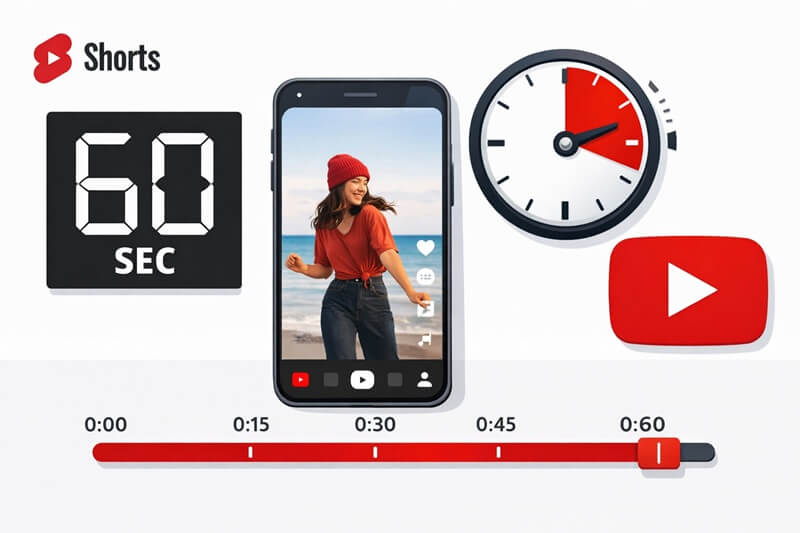
How long can a YouTube Short be? The maximum duration is 180 seconds (three minutes). Period. Not 181 seconds. Not 179.5 seconds that somehow rounds up. Exactly 180 seconds or less.
YouTube updated this limit back in 2021. Originally, Shorts maxed out at 15 seconds, mimicking TikTok’s early format. But creators wanted more flexibility. More time to tell stories. More room for tutorials and product showcases.
YouTube listened and allowed 60 second Shorts.
The limit was updated again in 2024 to allow videos up to 180 seconds.
Here’s what qualifies as a Short:
- Duration: 180 seconds or less
- Aspect ratio: Vertical (9:16 is ideal)
- Resolution: Minimum 720p recommended
- Title or description: Should include #Shorts (though not always required)
Upload a 61-second video? YouTube treats it as Short but with some restrictions EG copyright treatment. It will still appear in the Shorts feed.
How Long Can a YouTube Short Be for Optimal Performance?
Just because you can make a 180-second Short doesn’t mean you should. The ideal length depends on your content type, audience, and goals.
The Sweet Spot: 30-45 Seconds
Most successful creators aim for 30-45 seconds. Why? This range gives you enough time to:
- Hook viewers in the first 2-3 seconds
- Deliver valuable content or entertainment
- Include a call-to-action
- Maintain high completion rates
Completion rate matters.
A lot.

When viewers watch your entire Short, YouTube’s algorithm interprets that as a quality signal. Your video gets pushed to more people. Creating engaging content that keeps viewers watching until the end is crucial for algorithmic success.
Shorter Shorts (15-30 Seconds)
These perform exceptionally well for:
- Quick tips or hacks
- Memes and humor
- Shocking or surprising content
- Simple before/after reveals
The advantage? Higher completion rates. Viewers are more likely to watch a 20-second video all the way through than a 55-second one. But you sacrifice depth. There’s less time to build connection or explain complex ideas.
Longer Shorts (60 – 180 Seconds)
Use the full time when you need to:
- Tell a complete story
- Demonstrate a multi-step process
- Build emotional investment
- Provide educational content
The trade-off is retention. You’ll likely see more drop-offs. But if your content is compelling enough, those who stick around are more engaged. They’re more likely to subscribe, comment, or check out your long-form content.
Understanding YouTube Shorts Length and Viewer Retention
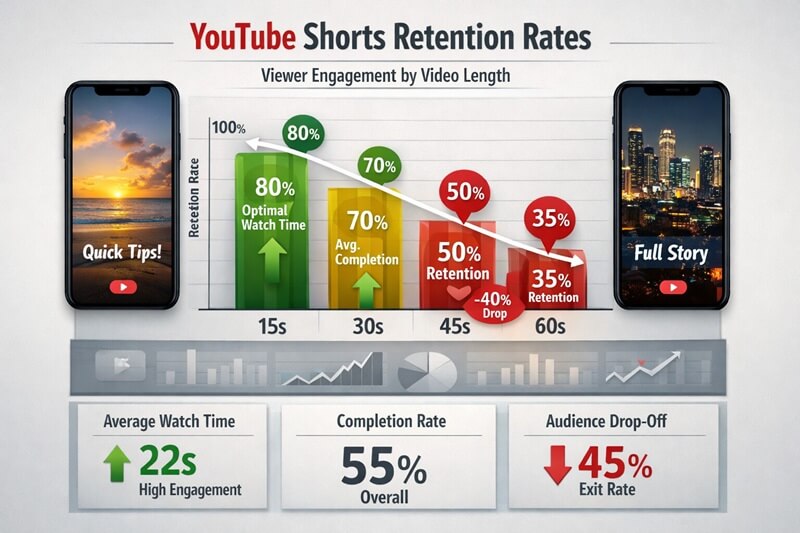
Here’s the truth: viewer retention drops as video length increases. It’s not a linear relationship, though. The drop-off is steeper at certain points.
The First 3 Seconds Are Make-or-Break
About 50% of viewers decide whether to keep watching in the first three seconds. Doesn’t matter if your Short is 15, 60, or 120 seconds. That opening hook determines everything.
Start with:
- A provocative question
- A bold statement
- Immediate visual interest
- A promise of value
Never start with intros, logos, or slow build-ups. Get to the point immediately. You can learn more about creating engaging hooks here.
The 30-Second Wall
Many creators notice a significant drop-off around the 30-second mark. Viewers who’ve made it this far are invested, but their patience isn’t unlimited. This is why the 30-45 second range works so well. You get substantial content without hitting the fatigue point.
Retention by Content Type
Different content types have different optimal lengths:
| Content Type | Ideal Length | Why |
| Comedy/Memes | 15-25 seconds | Punchline delivery, quick laughs |
| Tutorials | 35+ seconds | Enough time to show steps |
| Storytelling | 45+ seconds | Narrative arc completion |
| Product Demos | 30-40 seconds | Feature showcase + CTA |
| Motivational | 20-35 seconds | Impact without preaching |
How Video Length Impacts Your YouTube Shorts Reach
The YouTube Shorts algorithm doesn’t explicitly penalize longer videos. But it heavily rewards engagement metrics, and length directly affects those metrics.
Completion Rate Is King
If 80% of viewers watch your entire 25-second Short, that’s phenomenal. If only 40% complete your 58-second Short, the algorithm sees lower engagement—even if the absolute watch time is higher.
YouTube wants to keep people in the Shorts feed. Videos that keep viewers engaged get promoted. Simple as that.
Watch Time vs. Completion Rate
There’s tension here. A 60-second video with 50% completion gives you 30 seconds of watch time per viewer. A 30-second video with 85% completion gives you 25.5 seconds. The longer video wins on watch time, but the shorter one wins on completion rate.
Which matters more? Completion rate, according to most creator experiences and YouTube’s guidance. The algorithm interprets completion as satisfaction. Satisfied viewers stay in the Shorts feed longer, watching more ads.
The Rewatch Factor
Shorter Shorts get rewatched more often. A clever 18-second video might loop 2-3 times before a viewer scrolls. That’s multiple “completions” for the algorithm. A 55-second Short rarely gets an immediate rewatch.
This is why creating viral content often means keeping things concise and rewatchable.
How Long Can a YouTube Short Be – Compared to Other Platforms?
Understanding how YouTube Shorts length compares to competitors helps you repurpose content effectively.
Platform Length Limits (2026)
- YouTube Shorts: Up to 180 seconds
- TikTok: Up to 10 minutes (but Shorts-style content typically under 60 seconds)
- Instagram Reels: Up to 90 seconds
- Facebook Reels: Up to 90 seconds
- Snapchat Spotlight: Up to 60 seconds
YouTube’s 180-second limit puts it on the high end. You can often repurpose YouTube Shorts for TikTok or Snapchat without editing. The key is to target the sweet spot that will accommodate all social media platforms (or prepare to split it into parts).
Cross-Platform Strategy
Smart creators optimize for the most restrictive platform first. Create a 60-second Short, and you can post it everywhere. Create a 90-second Reel, and you’ll need to edit it down for other platforms.
Tools for automated short-form video creation can help streamline this multi-platform approach, letting you create once and distribute everywhere.
Technical Considerations for YouTube Shorts Length
Beyond just hitting the 60-second mark, there are technical details that affect how YouTube processes your Short.
File Upload vs. Displayed Length
Here’s a quirk: the video file you upload might be slightly different from the displayed length. YouTube’s processing can add or subtract frames. Always aim for 59 seconds or less to be safe. That one-second buffer prevents accidental disqualification.
Recording Directly in YouTube
The YouTube mobile app lets you record Shorts directly. The built-in camera automatically stops when you’ve hit the time limit which you can set to 15 seconds or 180 seconds. No guesswork. No editing needed. It’s the safest way to ensure you stay within limits.
Editing Existing Videos
Turning long-form content into Shorts? Learning how to clip YouTube videos effectively is essential. Look for:
- Self-contained moments
- High-energy segments
- Surprising revelations
- Actionable tips
Each clip should work as standalone content, not just a teaser.
Best Practices for Choosing Your YouTube Short Length
So how do you decide how long your specific Short should be? Follow this framework:
1. Start with Your Core Message
What’s the one thing you want viewers to remember? Write it down in one sentence. Now, how long do you need to communicate that effectively?
- Simple concept: 15-25 seconds
- Moderate complexity: 30-60 seconds
- Detailed explanation: 45+ seconds
2. Test Different Lengths
Don’t assume. Test. Create similar content at different lengths and compare performance. Track:
- Average view duration
- Completion rate
- Engagement (likes, comments, shares)
- Click-through to your channel
3. Front-Load Your Value
Whatever length you choose, put your best content in the first half. Don’t save the entire payoff for the end. Viewers who drop off at 30 seconds should still get value.
4. Use Pacing to Your Advantage
Quick cuts, dynamic visuals, and energetic pacing can make a 50-second Short feel like 30 seconds. Slow, contemplative content makes 30 seconds feel like a minute.
Match your pacing to your length. Longer Shorts need faster pacing to maintain energy.
5. End with a Hook
The last 2-3 seconds should encourage action:
- “Follow for part 2”
- “Which option would you choose?”
- “Try this and let me know how it goes”
This increases engagement and signals to the algorithm that your content sparks conversation.
Common Mistakes with YouTube Shorts Length
Even experienced creators make these errors:
Mistake #1: Maxing Out Every Time
Not every idea needs 180 seconds. Stretching a 30-second concept to fill time kills retention. Respect your audience’s time. If you can say it in 25 seconds, do that.
Mistake #2: Rushing Complex Topics
Conversely, cramming a 90-second explanation into 60 seconds frustrates viewers. They leave confused. Break complex topics into a series of Shorts instead.
Mistake #3: Ignoring Platform Norms
YouTube Shorts viewers have expectations shaped by TikTok and Instagram. They expect quick, punchy content. A 60-second talking head monologue rarely performs well, even if the content is good.
An exception to this is if you’re a good storyteller. If you are, you can do talking head videos all day.
Mistake #4: Forgetting Mobile Viewing
Most Shorts are watched on phones, often with sound off initially. Your video needs to work visually at any length. Add captions. Use text overlays. Make it scannable.
Mistake #5: Not Analyzing Performance
YouTube Studio provides detailed analytics. Check your audience retention graphs. Where do people drop off? Adjust your length and pacing accordingly.
Getting more views on YouTube Shorts requires constant iteration based on data.
Creating YouTube Shorts Efficiently
Wondering how long it takes to create a YouTube Short? That’s a different question from how long the Short itself can be. The production time varies wildly:
- Simple phone recording: 5-15 minutes
- Edited content with graphics: 30-90 minutes
- Highly produced Shorts: 2-4 hours
Platforms like QuickVid can dramatically reduce production time by automating much of the editing process. This lets you focus on strategy and content rather than technical execution.
The key is finding a sustainable workflow. Posting consistently matters more than perfection. Three good 40-second Shorts per week beat one perfect 60-second Short per month.
Conclusion: Finding Your Perfect YouTube Short Length
How long can a YouTube Short be? Up to 180 seconds. But the real question is: how long should your Shorts be?
The answer depends on your content, audience, and goals. Start with the 30-45 second range. Test shorter and longer variations. Watch your retention metrics. Let data guide your decisions.
Remember:
- Completion rate matters more than total watch time
- Front-load your value—never bury the lead
- Match length to content complexity
- Faster pacing allows for longer videos without losing viewers
- Cross-platform compatibility favors 60 seconds or less
Ready to start creating? Learn how to make a YouTube Short with our comprehensive guide. Then put these length principles into practice.