You’ve probably noticed captions on videos everywhere lately. They’re not just a nice-to-have anymore. They’re essential.
But here’s something most creators don’t realize: not all captions are created equal.
The closed caption vs open caption debate might seem technical, but choosing the wrong type can seriously impact your video’s reach and engagement.
Let’s break down everything you need to know about these two captioning methods so you can make the right choice for your content.
Key Takeaways
- Closed captions are togglable text overlays stored separately from the video file that viewers can turn on or off through player settings
- Open captions are permanently embedded into the video during editing and cannot be disabled by viewers
- Closed captions offer flexibility and customization, while open captions guarantee visibility across all platforms and viewing scenarios
- Short-form social media content typically performs better with open captions due to muted autoplay features
- Your choice depends on platform, audience, and content type and sometimes you’ll need both
What Are Closed Captions?
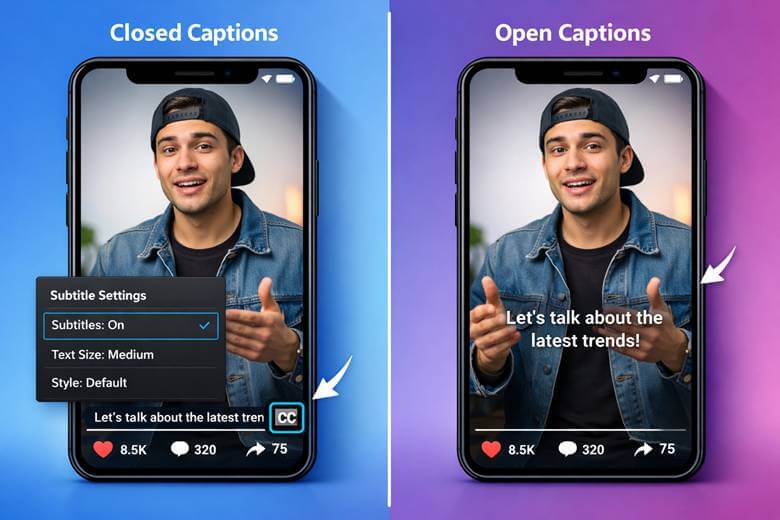
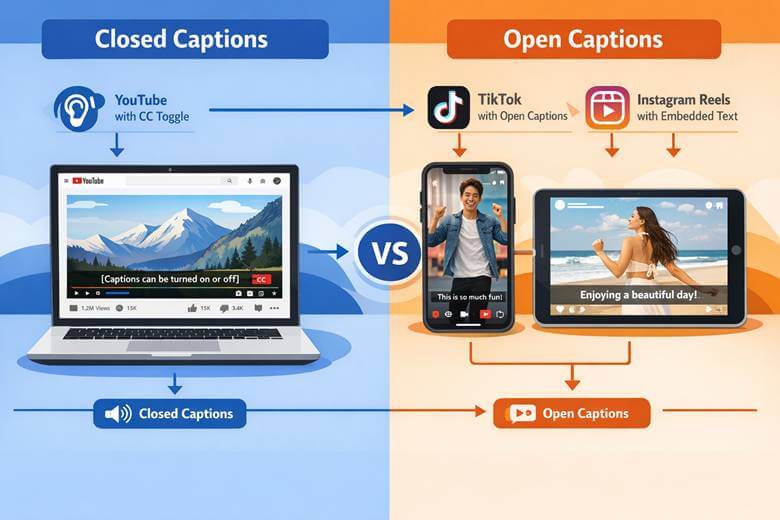
Closed captions are text overlays that exist as a separate file from your video. Think of them like an optional layer that viewers can toggle on or off.
They’re called “closed” because they’re hidden by default. Viewers need to actively enable them through the video player’s settings. You know, that little “CC” button you’ve seen on YouTube or Netflix.
Here’s what makes closed captions unique:
- Stored separately from the video file (usually as SRT, VTT, or similar formats)
- Customizable by the viewer (font size, color, background)
- Accessible through player controls
- Platform-dependent for display
Major broadcasters and streaming platforms like YouTube, Vimeo, and Facebook Live primarily use closed captions. They’re the industry standard for long-form content and professional broadcasts.
When Closed Captions Make Sense
Closed captions work best when:
- You’re uploading to platforms with robust caption support
- Your audience watches with sound on by default
- You want to give viewers display control
- You’re creating long-form content like tutorials or webinars
- You need to comply with broadcasting regulations
The flexibility is huge. Some viewers prefer larger text. Others want different colors. Closed captions accommodate everyone’s preferences.
What Are Open Captions?
Open captions are the complete opposite. They’re permanently burned into your video during the editing process.
There’s no toggle. No settings menu. No way to turn them off.
What you see is what you get—and that’s exactly the point. Open captions ensure that everyone sees your text, regardless of platform, device, or technical know-how.
Key characteristics of open captions:
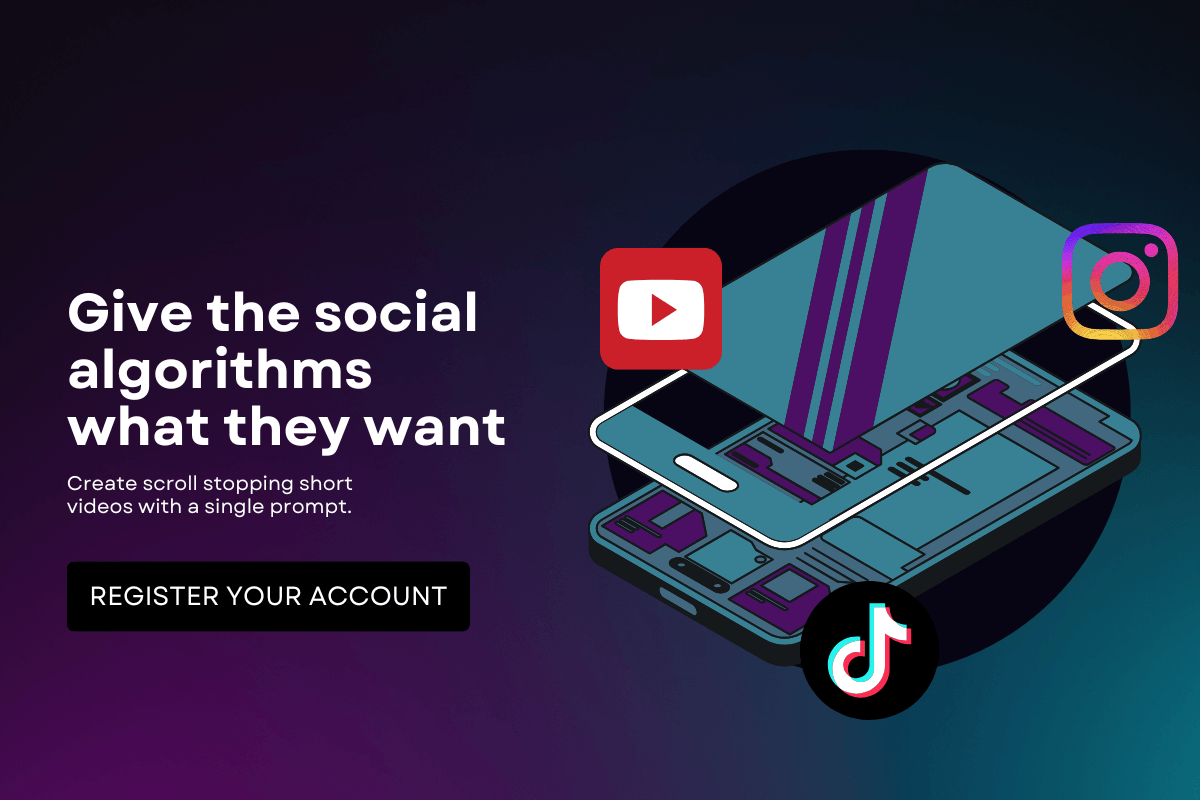
- Embedded permanently into the video file
- Always visible to all viewers
- Consistent appearance across all platforms
- No player support required
Open captions have exploded in popularity for short-form video content. Scroll through TikTok or Instagram Reels, and you’ll see them everywhere.
When Open Captions Are the Better Choice
Open captions excel when:
- Creating content for social media platforms where videos autoplay muted
- Your audience primarily watches on mobile devices
- You want to guarantee caption visibility
- Platform caption support is unreliable or inconsistent
- You’re making content that relies heavily on text for context or humor
Here’s the reality: 85% of Facebook videos are watched without sound. Open captions aren’t optional anymore for social content. They’re an essential element.
Closed Caption vs Open Caption: The Key Differences
Let’s put these two head-to-head so you can see exactly how they compare.
| Feature | Closed Captions | Open Captions |
| Visibility | Optional (togglable) | Always visible |
| File Storage | Separate file | Embedded in video |
| Customization | Viewer-controlled | Creator-controlled |
| Platform Support | Requires player support | Works everywhere |
| File Size | Minimal impact | Slight increase |
| Editing Flexibility | Easy to update | Requires re-export |
| Accessibility | Requires user action | Universally accessible |
The closed caption vs open caption choice isn’t about which is objectively better. It’s about which serves your specific needs.
Accessibility Considerations
Both caption types serve accessibility needs, but in different ways.
Closed captions provide flexibility for viewers with hearing impairments. They can adjust text size, choose high-contrast colors, and customize the viewing experience. That’s powerful.
But here’s the catch: viewers need to know how to enable them. Not everyone does.
Open captions eliminate that barrier. They ensure universal visibility without requiring technical knowledge. Someone’s grandmother doesn’t need to figure out YouTube’s settings menu. The captions are just there.
“Open captions ensure that accessibility is built-in, not opt-in.”
For true accessibility, consider your audience’s technical literacy. If you’re targeting a broad demographic, open captions might be the safer bet.
Platform-Specific Recommendations
Different platforms have different caption cultures. Here’s what works where:
YouTube
Recommendation: Closed captions
YouTube has excellent caption support. Upload an SRT file, and you’re golden. Viewers can customize appearance, and you can easily update captions without re-uploading videos.
TikTok & Instagram Reels
Recommendation: Open captions
These platforms are built for muted viewing. Videos autoplay without sound as users scroll. Open captions aren’t just helpful, they’re critical for engagement. QuickVid allows you to caption any social media video so you don’t spend hours doing it manually.
Recommendation: Both
Facebook supports closed captions, but videos autoplay muted in feeds. Use open captions for native posts, closed captions for longer uploaded content.
Recommendation: Open captions
Professional audiences often browse during work hours with the sound off. Open captions ensure your message gets across silently.
The platform dictates the strategy. Understanding how long Instagram Reels can be, or other platform-specific requirements, helps you optimize your captioning approach.
The Social Media Factor
Social media has fundamentally changed the closed caption vs open caption equation.
Autoplay changed everything. When videos start playing automatically without sound, captions become your first impression. They’re not accessibility features anymore, they’re engagement tools.
Studies show that captioned social videos get:
- Higher completion rates
- Better engagement metrics
- More shares
- Improved watch time
Open captions work because they’re guaranteed to appear. You’re not relying on platform support or viewer action. The text is there, period.
This is especially true for content that depends on dialogue or narration. Without captions, muted viewers just scroll past. With them, you’ve got a chance to hook them.
Technical Considerations
Let’s talk about the practical stuff.
Creating Closed Captions
You’ll need:
- A caption file (SRT, VTT, or platform-specific format)
- Accurate timestamps
- Platform upload capability
Most video platforms provide caption upload tools. You can create captions manually, use auto-generation features, or hire transcription services.
The advantage? You can update captions anytime without touching the video file.
Creating Open Captions
You’ll need:
- Video editing software
- Caption styling decisions (font, size, position, color)
- Final export with captions embedded
Open captions require more upfront work. You’re making design decisions that can’t be changed later without re-editing the entire video.
But they’re foolproof. Upload your video anywhere, and the captions come with it.
Making Your Decision: A Practical Framework
Still not sure which to choose? Ask yourself these questions:
1. Where will this video live?
- Single platform with good caption support → Closed captions
- Multiple platforms or social media → Open captions
2. How will people watch it?
- Sound-on environment → Closed captions
- Muted/silent browsing → Open captions
3. Who’s your audience?
- Tech-savvy viewers → Closed captions
- General/broad audience → Open captions
4. What’s your content type?
- Long-form, educational → Closed captions
- Short-form, social → Open captions
5. Do you need to update captions frequently?
- Yes → Closed captions
- No → Open captions
There’s no universal right answer. The closed caption vs open caption debate comes down to your specific situation.
Best Practices for Both Caption Types
Regardless of which type you choose, follow these guidelines:
For Closed Captions:
- ✅ Upload accurate, properly timed caption files
- ✅ Review auto-generated captions for errors
- ✅ Include sound effects and speaker identification
- ✅ Test on multiple devices
- ✅ Provide multiple language options when possible
For Open Captions:
- ✅ Choose readable fonts (sans-serif works best)
- ✅ Use high-contrast colors (white text with black outline is standard)
- ✅ Position text strategically (avoid covering important visuals)
- ✅ Keep text on screen long enough to read comfortably
- ✅ Match caption style to your brand aesthetic
Quality matters more than type. Bad captions, whether open or closed, hurt more than they help.
The Future of Captions
Caption technology keeps evolving. AI-powered auto-captioning gets better every year. Real-time translation opens global audiences. Style customization becomes more sophisticated.
But the fundamental closed caption vs open caption distinction will likely remain. Each serves different needs in different contexts.
The trend? More captions, everywhere. Platforms increasingly prioritize captioned content in algorithms. Audiences expect it. Accessibility regulations require it.
Smart creators don’t choose between closed and open captions. They use both strategically, depending on the platform and content type.
Conclusion
The closed caption vs open caption decision isn’t complicated once you understand the core difference: one is optional, one is permanent.
Closed captions offer flexibility and viewer control. They’re perfect for platforms with strong caption support and audiences who actively engage with accessibility features.
Open captions guarantee visibility and eliminate barriers. They’re essential for social media, mobile viewing, and ensuring your message reaches everyone regardless of technical knowledge.
The best caption strategy? The one you’ll implement. Start adding captions to your videos today. Your audience (and your engagement metrics) will thank you.